
Best SaaS demo video makers in 2026: 12 tools compared
Twelve SaaS demo video makers sorted by the job they do: AI demo video generators, screen recorders and editors, interactive demo platforms, and avatar tools, with October 2026 prices and G2 ratings for each.
TL;DR
- A SaaS demo video maker turns a screen recording, a script, a document, or a prompt into a narrated video of your product. Four kinds of tool use the name: AI demo video generators, screen recorders and editors, interactive demo platforms, and avatar-led generators.
- If your team ships product video with every release, start with an AI demo video generator. The cost that keeps coming back is fixing a video after the UI changes, and these tools let you fix one step instead of redoing the video.
- AI demo video generators: Clueso for teams that ship product video every release, Trupeer for solo creators who want video and docs, Guidde for how-to videos on a budget, and Arcade or ngram for short AI marketing videos.
- Screen recorders and editors: Descript for editing recorded demos as text, Camtasia for desktop editing with full manual control, and Loom for quick async walkthroughs.
- Interactive demo platforms: Supademo for quick click-through demos, and Storylane for personalized sales demos.
- Avatar-led generators: Synthesia for multilingual presenter-led training, and HeyGen for realistic avatars and dubbing.
- Every tool here can record your screen. Compare them on how long a corrected video takes after a release.
- Pricing verified October 27, 2026.
Tool | Best for | Starts at | G2 rating |
|---|---|---|---|
1. Clueso | Teams that ship product video every release | Free plan · $40/mo | 4.8/5 |
2. Trupeer | Solo creators who want video and docs from one recording | 10-day free trial · $40/mo | 4.7/5 |
3. Guidde | Step-by-step how-to videos on a budget | Free plan · $19/creator/mo | 4.8/5 |
4. Arcade | Marketers making short AI product videos | Free plan · $49/mo | 4.6/5 |
5. ngram | Product marketers who want AI to script the video | Free plan · $23.20/mo | 4.5/5 |
6. Descript | Editing recorded demos as text | Free plan · $16/person/mo | 4.6/5 |
7. Camtasia | Desktop editing with full manual control | $39/yr (Starter) | 4.6/5 |
8. Loom | Quick async walkthroughs | Free plan · $15/user/mo | 4.7/5 |
9. Supademo | Quick click-through demos | Free plan · $38/creator/mo | 4.7/5 |
10. Storylane | Personalized sales demos | Free plan · $40/mo | 4.7/5 |
11. Synthesia | Multilingual presenter-led training | Free plan · $14/mo | 4.6/5 |
12. HeyGen | Realistic avatars and dubbing | Free plan · $24/mo | 4.8/5 |
Paid prices are the lowest monthly rate on yearly billing, per seat where the vendor charges per seat. G2 ratings read October 27, 2026 (Q4 2026).
A B2B SaaS team almost never makes a demo video once. A release moves a button or renames a menu, and the walkthroughs in your help center and onboarding emails now show a screen your customers can't find. Somebody has to record and narrate those steps again, usually while the next release is already in QA.
Teamworks ran into this at scale. Its customer education team supports more than 20 products, and one short video used to pass through four different tools and take 4–5 hours. After the team moved production into Clueso, a video takes 20–30 minutes, and it ships 10–15 a month instead of three to five (Teamworks customer story).
This guide compares 12 SaaS demo video makers on what happens after the first recording, when a UI change means fixing a step and several people need their videos to match. It names a pick for each kind of team, and says where an interactive demo or an AI avatar tool is the better buy.
What is a SaaS demo video maker?
A SaaS demo video maker turns a screen recording, a script, a document, or a prompt into a finished video that shows how your software works. The stronger tools write the script, generate an AI voiceover, zoom in on the clicks that matter, and apply your branding, so a product expert can publish the video without an editor.
Teams use the same software for launch demos and for product tutorial videos with voiceover. Four kinds of tool compete for the name, and each produces a different deliverable. Choosing the category first prevents you from spending time comparing tools that cannot create the format you need.
Why SaaS teams need different demo video tools for different jobs
AI demo video generators, sometimes called screen-recording-to-video tools, turn a real product workflow into a finished, linear video. They suit product marketing, onboarding, sales enablement, and customer education when viewers need to see the actual software in use. The newer tools in this group also start from a script, a document, or a prompt. Tools like Clueso automate end-to-end production and editorial work.
Screen recorders and editors capture the screen well and leave more of the editing to you. Descript and Camtasia give an editor fine control over timing and media, and Loom sends a quick recording out as it is.
Then there are interactive demo platforms such as Supademo and Storylane that create click-through product experiences with hotspots, guided paths, or branching. They work well when prospects need to explore a product themselves. These platforms serve a different purpose from a rendered SaaS demo video that you can publish across marketing and training channels.
A fourth category is avatar-led generators such as Synthesia and HeyGen that create presenter-style videos from scripts. They fit multilingual explainers and training content, especially when a human-like presenter matters more than an authentic product workflow. Product footage can appear within these videos, but the avatar remains the main presentation layer.
Start with what's broken. If buyers can't try your product before a sales call, you want an interactive demo they can click through on your website. If customers and new hires keep asking how something works, you want a demo video.
If the videos you already have go stale after every release, you want an AI demo video generator specifically, because that layer is built around fixing a step instead of redoing the video. And if no product needs to be on screen, as with a policy update or a leadership announcement, an avatar tool will do it without anyone on camera.
AI demo video generator | Screen recorder or editor | Interactive demo platform | Avatar-led generator | |
|---|---|---|---|---|
What it makes | A narrated, branded video from a recording, script, document, or prompt | A recording you edit yourself | A clickable copy of your product that the viewer drives | A video of an AI presenter reading your script |
Where it's watched | Help center, LMS, onboarding emails, launch pages, sales follow-ups | Internal updates, plus anywhere one polished cut is needed | Website, landing pages, email links | Internal training and announcements |
Who owns it | Product marketing, customer education, support, L&D | Whoever records, or a video editor | Demand gen, sales, growth | L&D, HR, internal comms |
You need it when | You ship product video every release and have no editor | You have an editor, or need one quick recording | Buyers want to try the product before a call | No product needs to be on screen |
Typical cost | Free plans; paid from $19 to $49 a month | Free plans; paid from $15 a user a month (Loom) to $599 a year (Camtasia Pro) | Free plans; paid from $38 a creator a month (Supademo) | Free plans; paid from $14 a month (Synthesia, billed yearly) |
After a UI change | In the stronger tools, re-capture the changed step or edit the script line and regenerate the voiceover | Re-record and re-edit the affected section | Re-capture the changed screens | Usually nothing, unless product footage appears in the video |
This guide ranks the video tools first and covers interactive demo platforms and avatar tools after them. Our product walkthrough software guide compares walkthrough formats in more depth.
What to look for in a SaaS demo video maker
It survives a UI change. Ask each vendor what happens when a button moves in next month's release. A good answer is that you re-record the one step that changed, or edit a line of the script, and the voiceover regenerates to match. If the answer is a new recording and a fresh edit of the whole video, budget for redoing that work after each release.
It keeps every contributor on brand. Once a support lead and a product marketer are both making videos, consistency depends on templates rather than on anyone's editing skill. Look for brand kits or templates that fix fonts, colors, intros, and layout once, so every video comes out matching.
It gives you a written guide as well as the video. Support and L&D teams usually publish a step-by-step article next to the video. A tool that writes both from the same source saves you a second tool, and a second round of edits after every release.
It localizes without re-recording. If you sell or train in more than one language, check what the tool translates and whether it keeps product names in English. Personio cut a video in four languages from 5.5 days to 2 days once translation and AI voiceover lived in the same tool (Personio customer story).
Editorial methodology and disclosure
Clueso publishes this guide and sells one of the tools in it. We rank Clueso first for one job: turning a recording, script, document, or prompt into a finished product video and a written guide, and keeping both current as the product changes. That's a biased ranking, and the team picks under "Which should you choose?" are ours too. The "Is Clueso right for you?" section says plainly who should buy something else.
A ranked tool needed a G2 rating of 4.0 or higher from at least 50 reviews, and visible product or pricing changes in the past 6 months. We read each G2 profile by hand on October 27, 2026, and each vendor's own pricing page the same day. Camtasia's prices are TechSmith's US store prices from September 2026. All prices are USD list prices.
We compared each product on what it produces and how much work that takes, using the vendor's documentation, its pricing page, and its G2 reviews. The production assessment covers speed, editing effort, branding, and script and voiceover quality. Buyer fit also depends on interactivity, localization, collaboration, export options, and pricing. We didn't run timed hands-on tests for this edition, so nothing below claims one.
Maintenance receives separate attention because SaaS interface changes can quickly make recorded demos inaccurate. The video tools come first because this is a guide to demo video. Interactive demo platforms and avatar tools make a different deliverable, so they're ranked within their own sections after the video tools.
We left out consumer editors such as Canva and Clipchamp, which aren't built to capture and explain a software workflow, and Screen Studio, which had two G2 reviews when we checked. Navattic passes our thresholds but gets a shorter note, because it doesn't publish prices for its paid plans.
AI demo video generators: for teams that ship video every release
These tools start from someone clicking through the product while talking, or from a script, a document, or a prompt, and they do the production work themselves. Clueso competes in this layer, so read the ranking with the disclosure above in mind.
1. Clueso — best for teams that ship product video every release
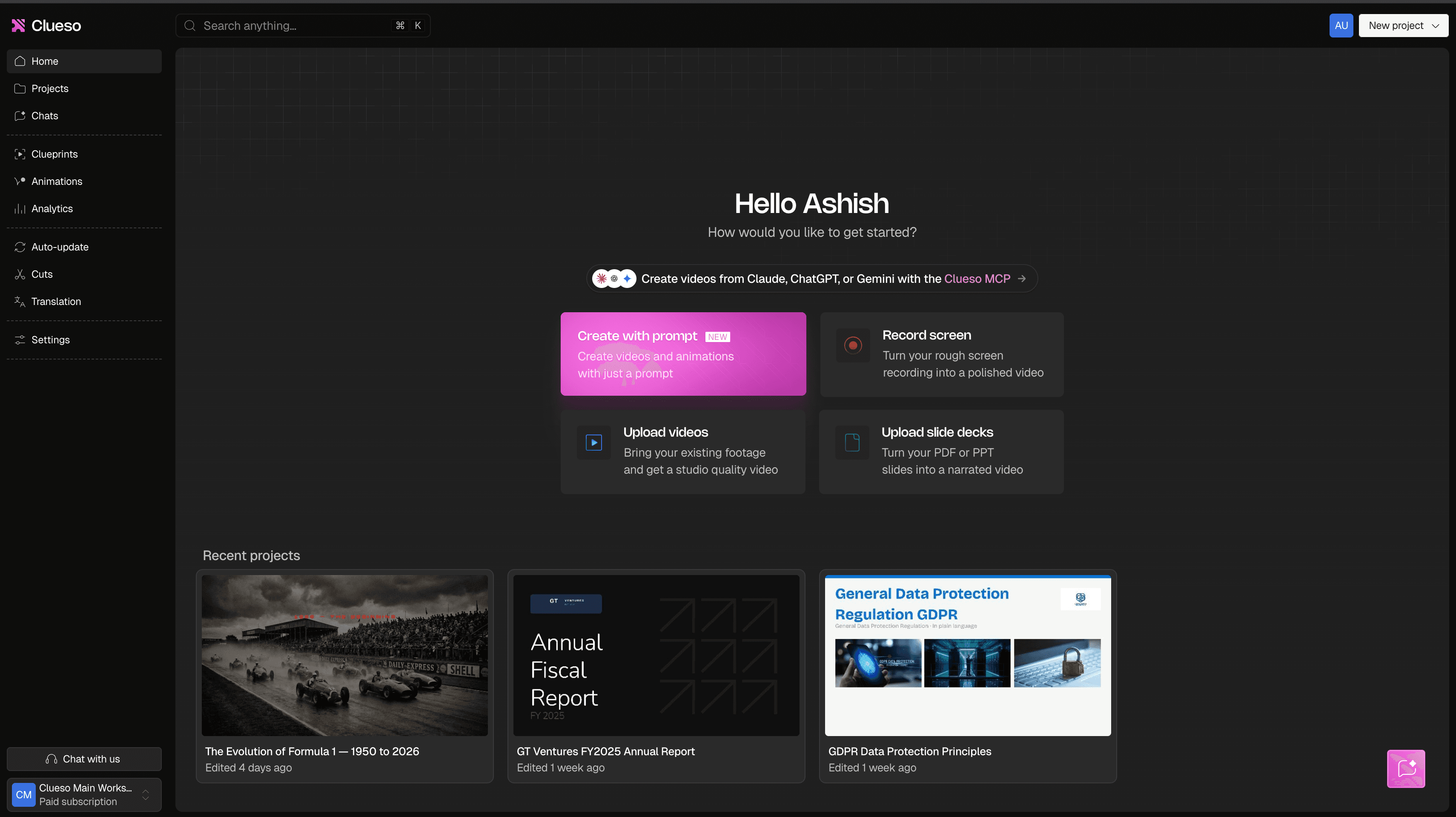
Best for: Clueso is the best choice for SaaS teams that want to turn product recordings, scripts, documents, or a prompt into polished, branded demo videos with minimal manual editing. It suits product marketing, sales enablement, and customer education content that needs to show the actual software.
What is Clueso? Clueso is an agentic video platform for businesses that converts a raw screen recording, a script, a document, a slide deck, or a prompt into an edited software demo video. On every plan you can also build and edit videos from Claude or ChatGPT through the Clueso MCP. Its AI improves the narration script, generates a natural-sounding voiceover, adds captions, and applies visual effects such as automatic zooms. From a recording, you can start by demonstrating the product normally instead of writing a complete script or planning every edit before recording.
Key features
- Clueso reduces scriptwriting and narration work. It uses the recorded workflow to draft a clearer script, then turns that script into an AI voiceover, so you get professional narration without recording multiple takes or hiring a voice actor. A multi-track timeline with keyframes covers the edits you want to make by hand.
- Step-by-step guides generated from the same recording, with a screenshot at each step, exportable as DOCX, PDF, Markdown, or HTML.
- AI motion graphics generated from a prompt, for the parts of a process that are clearer illustrated than recorded.
- Clueprints give recurring demos a reusable structure and visual identity. You can standardize elements such as introductions, branding, and motion graphics, which helps separate creators produce consistent videos without rebuilding the format each time. Community Clueprints are on every plan, and custom ones are on Enterprise.
- Clueso protects sensitive information inside recorded screens. You can blur any area by hand on every plan. On Enterprise, auto-blur finds account numbers, IDs, and credentials on its own or swaps in dummy data, so product marketers can record realistic workflows without exposing customer or internal data.
- Clueso can translate demos into 150+ languages on every plan. You can create dubbed versions, or translate only the subtitles and keep the original audio when a full voiceover translation would add unnecessary cost. Enterprise adds a translation glossary that keeps product names untranslated.
- On the Enterprise plan, videos can carry quizzes, hotspots, branching, chapters, and click-through steps, and export to an LMS as SCORM 1.2, SCORM 2004, or xAPI. Enterprise also adds in-app guided tours, which walk a user through the clicks on your live product.
- Clueso helps you maintain demos after the interface changes. You can patch the outdated clip instead of recording the full demo again, and the revised video updates across its existing embeds and links. On Enterprise, with GitHub connected, Clueso Agents monitor changes in your product codebase and flag the demos a release made stale, and the auto-update agent that regenerates them is a paid Enterprise add-on.
Pricing. Free plan with 10 minutes of video exports a month, watermarked, at up to 1080p. Solo $40/month billed yearly or $50 monthly. Business $120/month billed yearly ($150 monthly) for two users, plus $40/month for each extra user billed yearly. Enterprise is custom (Clueso pricing page, October 2026).
Why teams use it. The people who know the product make the video themselves, and a release means fixing the steps that changed rather than starting over. Intellum's education team cut a video from 6–7 hours to 1–2 hours, and made more than 100 certification videos in under 3 months (Intellum customer story).
Where it isn't the answer. Clueso's interactivity lives inside the video and in guided tours on your own product, and both are on Enterprise. If prospects need a hosted, clickable replica of your product on your website, Supademo or Storylane fit better.
Clueso centers the real product interface rather than an on-screen presenter. You can add an AI avatar or motion graphics, but Synthesia or HeyGen may suit presenter-led videos better when a digital avatar needs to carry most of the explanation.
The self-serve plans also cap exports. Solo covers 3 hours of finished video a year and Business covers 6 hours for two users, so a team publishing several videos a week will need add-on exports or Enterprise. The features that keep a large library current with the least manual work (change detection, editing with AI chat, and the translation glossary) are Enterprise-only.
G2 rating. 4.8/5 (Based on 140 reviews) (Q4 2026)
Real review. "After using Clueso, there is no going back to editing apps for making our demo videos." (Quratul A., Small-Business (50 or fewer emp.), September 2026)
Bottom line: the strongest pick for a SaaS team that ships product video every release and needs the written guide too.
2. Trupeer — best for solo creators who want video and docs from one recording
Best for: Trupeer suits solo creators and small teams that want an AI-narrated video and a written document from the same screen recording.
What is Trupeer? Trupeer turns a screen recording into an AI-narrated video and a written document. It now describes itself as building "AI-led training videos, process maps and docs" for software rollouts and workforce training.
Key features
- AI video and document generation from one screen recording, with automated transcription and script polish
- Document export to DOC, PDF, and Markdown on Pro
- AI translation for videos and docs, plus a brand kit, from the Scale plan
Pricing. A 10-day free trial with 1,000 AI credits and recordings up to 5 minutes. Pro $40/month billed yearly or $49 monthly for one creator. Scale $199/month billed yearly ($249 monthly) for three creators. Enterprise is custom. Extra credits cost $4 per 100, which Trupeer says covers one minute of AI video (Trupeer pricing page, October 2026).
Update (October 2026): Trupeer's site now leads with "Enterprise Transformation Software" for software and process rollouts, rather than product demos.
Why teams use it. It does the recording-to-video-and-document job at the same entry price as Clueso Solo, with a free trial to test it on your own product.
Where it isn't the answer. AI generation draws on a credit pool, so the bill rises with volume and top-ups add up for a team producing every week. Translation and the brand kit start on Scale at $199 a month, so a single Pro seat can't localize a video.
G2 rating. 4.7/5 (Based on 69 reviews) (Q4 2026)
Real review. "Trupeer solves about 90% of the hardest part of creating product demos, tutorials, and tours from scratch." (Product Design Manager, Mid-Market (51-1000 emp.), July 2026)
Bottom line: the closest like-for-like alternative to Clueso. Budget for credits as well as seats.
Compare: Trupeer alternatives · Clueso vs Trupeer
3. Guidde — best for step-by-step how-to videos on a budget
Best for: Guidde best suits SaaS teams that want to capture a workflow and turn it into step-based instructional content.
What is Guidde? Guidde is a screen-recording-to-video tool with roots in AI-assisted documentation. Its documentation-first approach fits onboarding, support, and internal walkthroughs where viewers need to follow a defined sequence. It captures a workflow through a browser extension and turns it into a step-by-step video guide with voiceover, captions, and a shareable link.
Key features
- Capture from any web app, and from desktop apps on Business
- Magic Mic, which turns the narration you speak during capture into a cleaned-up AI voiceover
- A brand kit and exports to video, PPT, and PDF from the Pro plan
- AI voices in 50+ languages, with multi-language translation on Enterprise
Pricing. Free for up to 25 how-to videos. Pro $19 per creator/month billed yearly ($29 monthly). Business $39 per creator/month billed yearly ($59 monthly), for up to five creators. Enterprise is custom. A 7-day Business trial needs no credit card (Guidde pricing page, October 2026).
Why teams use it. Guidde earns credit when a walkthrough must teach a repeatable process rather than serve only as a marketing asset. Its step-based format makes procedural content quicker to scan and follow, and Pro is the cheapest paid seat among the AI demo video generators here.
Where it isn't the answer. Unlimited AI text-to-voice starts on Business, and Business stops at five creators. A company where product experts in several departments record their own videos reaches Enterprise pricing early, and translation is Enterprise-only.
G2 rating. 4.8/5 (Based on 97 reviews) (Q4 2026)
Real review. "It has enabled team members to independently create high-quality product walkthroughs and demos while maintaining brand consistency across business units. What once took hours—or even days—to produce can now be completed in minutes." (Verified User in Biotechnology, Enterprise (> 1000 emp.), August 2026)
Bottom line: a strong, affordable pick for internal how-tos. Check the creator cap before you roll it out widely.
Compare: Guidde alternatives · Clueso vs Guidde
4. Arcade — best for marketers making short AI product videos
Best for: Arcade works best for SaaS marketing teams that want short, polished AI product videos. It still sells embeddable, interactive product tours for websites and landing pages, on separate plans.
What is Arcade? Arcade began by turning captured product interactions into guided, click-through demos, where viewers explore the interface by advancing through hotspots and prompts. It now calls itself "the AI video playground for marketing teams." You capture your product with its Chrome extension, or ask for a video from your AI tools, and Arcade builds an on-brand cut you can change by prompt or by hand.
Key features
- A Chrome extension that captures screen and camera, with smart zooms and cursor movement
- Changes to any scene, line, or sound by asking the AI, while edits you make by hand cost no credits
- A choice of three Claude models for each video, which sets the credit cost
- Brand kits, plus videos up to 5 minutes with 4K export on Pro
Pricing. Free with 250 one-time credits, videos up to 30 seconds, and a watermark. Pro $49/month billed annually ($59 monthly), with 1,000 credits a month and up to 10 seats; larger credit tiers run to $469 a month. Enterprise is custom. Interactive demo plans are priced separately (Arcade pricing page, October 2026).
Update (October 2026): Arcade's pricing page now leads with its AI video plans. Interactive demos are sold on their own plans, and a demo subscription doesn't include AI video credits.
Why teams use it. Product marketers get a polished launch video from a short capture. Teams that already embed Arcade tours on product pages keep them in the same account, so prospects can still explore a workflow without booking a live demonstration.
Where it isn't the answer. Every generation and every AI edit spends credits. On the default High model, a 90-second video costs 200 credits and each AI edit costs 75, so Pro's 1,000 monthly credits cover about four such videos with a couple of AI edits. We didn't find a written step-by-step guide output on Arcade's site, so support and L&D teams would need a separate documentation tool.
G2 rating. 4.6/5 (Based on 181 reviews) (Q4 2026)
Bottom line: pick it for short marketing videos. A library that needs written guides and frequent revision will run through credits and still need a second tool.
5. ngram — best for product marketers who want AI to script the video
Best for: ngram suits product marketers who would rather approve a storyboard than direct an edit.
What is ngram? ngram makes AI videos "for onboarding, training, demos and explainers, from a prompt or a screen recording." You describe the video, ngram writes the script and storyboard, and you review it before it generates.
Key features
- Video from a prompt, a file, or a screen recording
- Script and storyboard review before generation
- Brand controls and 1080p export from the Premium plan
- Polls, quizzes, and call-to-action overlays on Ultimate
Pricing. Free with 1,000 credits a month; MP4 downloads need a paid plan. Basic $23.20/month billed annually ($29 monthly), with 720p exports. Premium $47.20/month billed annually ($59 monthly). Ultimate $239.20/month billed annually ($299 monthly). Enterprise is custom (ngram pricing page, October 2026).
Why teams use it. A marketer gets a finished launch video with little hands-on work, and can fix the script and storyboard before the video generates.
Where it isn't the answer. Basic covers about 300 seconds of premium AI generation a month at 720p, so a team producing weekly will need Premium or above. We didn't find a written step-by-step guide output on ngram's site.
G2 rating. 4.5/5 (Based on 66 reviews) (Q4 2026)
Bottom line: good for AI-scripted launch videos. Budget for credits, and for a separate docs tool if support needs articles.
Screen recorders and editors: for teams with an editor
These tools record well and give you full control of the edit, but the production work stays with you. They suit a team with a keen editor, or a team making one polished video at a time rather than a library.
6. Descript — best for editing recorded demos as text
Best for: SaaS teams that want hands-on creative control over recorded demo footage and prefer editing through both a transcript and a traditional timeline.
What is Descript? Descript combines screen recording, transcript-based editing, and timeline video editing. You can revise a recording by deleting words from its transcript, then adjust pacing, captions, audio, layouts, and visual elements in the timeline. AI features can remove filler words, improve recorded audio, and help revise narration.
Key features
- Text-based editing, with filler-word and retake removal
- AI Speech with custom voice clones, so you can regenerate a misspoken line
- A built-in screen recorder
- Translation and dubbing in 30+ languages on Business
Pricing. Free plan. Hobbyist $16/person/month billed annually ($24 monthly). Creator $24/person/month billed annually ($35 monthly). Business $50/person/month billed annually ($65 monthly). Enterprise is custom (Descript pricing page, October 2026).
Why teams use it. Descript gives you more control over timing and presentation than an AI demo video generator. Transcript editing makes spoken demos quicker to revise, especially when a presenter records extra takes or makes verbal mistakes. Its broader audio and video tools also suit teams that produce podcasts, interviews, and social clips alongside software demos.
Where it isn't the answer. Descript requires more production work than an AI demo video generator for a polished SaaS demo video. You still need to decide where to zoom, how to frame the interface, when to add visual emphasis, and how to organize the final narrative. It treats your recording as general video footage, and it doesn't write a step-by-step article from it.
G2 rating. 4.6/5 (Based on 930 reviews) (Q4 2026)
Bottom line: the best editor here for talking-head video. For a library of product walkthroughs, the editing time adds up.
Compare: Descript alternatives · Clueso vs Descript · Camtasia vs Descript
7. Camtasia — best for desktop editing with full manual control
Best for: Camtasia suits SaaS teams that want desktop recording, local media control, and hands-on editing.
What is Camtasia? Camtasia is TechSmith's desktop screen recorder and video editor for Windows and macOS. It combines screen recording with a traditional timeline editor. You record a product workflow, then arrange clips, remove mistakes, add callouts, adjust audio, and export a finished software demo video.
Key features
- A multitrack editor with cursor effects, animations, and transitions
- Quizzes and SCORM export from the Essentials plan
- AI script generation and voiceover with 200+ voices on Create
- Avatars, script translation, and audio dubbing on Pro
Pricing. Individual plans, billed yearly: Starter $39 (Snagit plus a watermarked editor), Essentials $179.88, Create $249, and Pro $599 (TechSmith store, US pricing, September 2026).
Update (September 2026): TechSmith sells its range as a suite, with Camtasia Snagit and Camtasia Audiate bundled alongside the editor.
Why teams use it. The desktop editor gives you precise control over timing, cursor movement, annotations, transitions, and audio. Local editing can also suit companies that do not want every recording processed through a browser-based service. Training teams get quizzes and SCORM export that slot into an existing LMS.
Where it isn't the answer. Camtasia asks for the most hands-on editing of the tools in this comparison. You handle more of the scripting, narration, visual cleanup, and timeline work yourself, although Create and Pro now add AI script generation and voiceover. SaaS teams producing frequent demos may find that workload slower than an AI demo video generator.
G2 rating. 4.6/5 (Based on 1,782 reviews) (Q4 2026)
Bottom line: the pick when you have an editor and want to build the whole course on the desktop.
Compare: Camtasia alternatives · Clueso vs Camtasia
8. Loom — best for quick async walkthroughs
Best for: Loom suits anyone who needs to send a teammate or a customer a quick walkthrough by link, recorded in one take.
What is Loom? Loom is Atlassian's screen and camera recorder for sharing quick videos by link.
Key features
- Screen and camera recording with instant share links
- Transcriptions in 50+ languages
- Trimming and editing, with AI auto-enhancement and video-to-text automation on Business + AI
Pricing. Starter is free for 25 videos with 5-minute recordings. Business $15/user/month billed annually ($18 monthly). Business + AI $20/user/month billed annually ($24 monthly). Enterprise is custom (Loom pricing page, October 2026).
Why teams use it. Nothing is faster for sending a teammate a walkthrough, and the free plan covers light use.
Where it isn't the answer. A Loom keeps your real voice and your first take, so a stumble or a UI change means recording again. A customer-facing library built from Looms has to be re-recorded, video by video, after each release that touches it.
G2 rating. 4.7/5 (Based on 2,415 reviews) (Q4 2026)
Bottom line: the right tool for internal async video. Pair it with a production tool for anything a customer sees.
Compare: Loom alternatives · Clueso vs Loom
Interactive demo platforms: for buyers who should click, not watch
These tools build a clickable copy of your product for your website, sales follow-ups, and help center. Clueso doesn't host website demos like these. Its Enterprise interactivity lives inside the video and in guided tours on your live product.
9. Supademo — best for quick click-through demos
Best for: Supademo suits SaaS teams that need prospects or customers to click through a guided product experience. Sales outreach, help centers, and website embeds fit its interactive format well.
What is Supademo? Supademo captures a product workflow as a sequence of interactive steps. You can add annotations, calls to action, and branching paths, then share the demo through a link or embed. Viewers control the pace instead of watching a fixed software demo video.
Key features
- Guided interactive demos plus 4K video recordings, shared as a link, an embed, a video, or a PDF
- Branching, dynamic variables, smart blur, and AI translation from the Scale plan
- Guided HTML demos with text and image editing from Business
- Demo versioning on Growth
Pricing. Free for one creator, with five guided interactive demos and 50 video recordings. Scale $38 per creator/month billed yearly ($50 monthly). Business $199/month billed yearly ($249 monthly) for one creator, plus $50/month for each extra creator. Growth $350/month billed yearly ($450 monthly) for five creators. Enterprise is custom and starts at 10 creators (Supademo pricing page, October 2026).
Update (October 2026): Supademo now sells an AI Demo Agent add-on that talks buyers through demos in 50+ languages, billed by usage, with credit packages from $99 for 1,400 credits.
Why teams use it. Quick capture and lightweight sharing make Supademo practical for producing interactive walkthroughs without engineering help. Branching lets viewers follow different routes based on their role or goal. Supademo also blurs sensitive screen content from its Scale plan.
Where it isn't the answer. Supademo works best when viewer interaction drives the experience. Teams that need a polished, narrated video for launch pages, social posts, or customer education may prefer an AI demo video generator. Supademo's annotations and branching options can also require more planning as a walkthrough expands.
G2 rating. 4.7/5 (Based on 657 reviews) (Q4 2026)
Bottom line: the quickest way to put a clickable demo in a sales email or on a landing page.
10. Storylane — best for personalized sales demos
Best for: Storylane fits sales teams that need personalized, interactive demos tailored to different buyers.
What is Storylane? Storylane creates guided product experiences that prospects can explore without entering a live SaaS account. Sales reps can tailor demo environments to an account and direct each prospect through a relevant path. Compared with Supademo's quick click-through capture, Storylane places more emphasis on sales personalization.
Key features
- Interactive demos from screenshots and video on every plan, and HTML demos with an editor for text and on-screen elements from Growth
- Personalization tokens for a prospect's name and other details
- Monthly AI credits for AI voiceovers, AI video avatars, and turning a video or a link into a demo, plus a Storylane MCP for building demos from Claude or ChatGPT
- Buyer hubs that bundle demos, PDFs, and videos into a deal room, plus AI translations, on Premium
Pricing. Free for one seat and one published demo, with 200 AI credits a month. Starter $40/month billed yearly ($50 monthly) for one seat, plus $40 for each extra seat. Growth $500/month billed yearly ($625 monthly) for five seats. Premium $1,200/month billed yearly ($1,500 monthly) for 10 seats. Enterprise is custom (Storylane pricing page, October 2026).
Why teams use it. Storylane lets buyers explore workflows at their own pace. Personalized demo environments also help sales reps present relevant screens without configuring a live account for every prospect.
Where it isn't the answer. Storylane does not primarily produce a finished, narrated software demo video. SaaS teams that need a polished video file for onboarding, customer education, or social channels will get a closer fit from an AI demo video generator. Interactive demos also require upkeep when the interface or workflow changes, and the HTML editor that makes those fixes faster starts on Growth at $500 a month.
G2 rating. 4.7/5 (Based on 1,633 reviews) (Q4 2026)
Bottom line: the stronger pick when each prospect should see a demo built around their own account.
Also worth a look: Navattic. Navattic builds HTML and media demos for marketing and sales teams, and rates 4.8/5 (Based on 1,138 reviews) on G2 (Q4 2026). Its Starter plan is free for one seat and one demo. Base adds five seats, unlimited HTML demos, AI voiceovers, and AI avatars, and Growth adds sandbox demos and demo translation. Both are billed annually, and Navattic doesn't list their prices (Navattic pricing page, October 2026).
Avatar-led generators: for presenter-led video without your product on screen
These tools generate a presenter who reads your script, which suits policy training and internal announcements where no product needs to be on screen. Clueso offers AI avatars as one element inside a product video, while these two build the whole video around the presenter. For a software walkthrough, a presenter can't show the clicks a viewer has to repeat. Our guide to AI avatars in video covers when a presenter helps.
11. Synthesia — best for multilingual presenter-led training
Best for: Presenter-led SaaS explainers and multilingual training videos where an AI avatar delivers a prepared script.
What is Synthesia? Synthesia turns written scripts into videos presented by AI avatars. You select an avatar and voice, add visual elements, and generate localized versions without recording a human presenter. The script-first workflow suits feature announcements, training modules, and high-level product explainers.
Key features
- AI avatars, with personal avatars and 240+ stock avatars on Enterprise
- AI dubbing, plus one-click translation into 140+ languages on Enterprise
- Interactive roleplays and conversational surveys led by an avatar
- SCORM export on Enterprise
Pricing. Free Basic plan with 10 minutes of video a month and a watermark. Starter $14/month billed yearly ($19 monthly). Pro $89/month billed monthly. Enterprise is custom (Synthesia pricing page, October 2026).
Update (October 2026): Synthesia's product menu now lists an AI screen recorder and AI motion graphics alongside its avatars, and its plans bill AI usage from one shared credit pool.
Why teams use it. Synthesia reduces the work involved in filming presenters and rerecording localized versions. Its avatar format also gives distributed teams a consistent presenter across a series of videos. You can combine narration with screenshots or product footage when the interface needs supporting context.
Where it isn't the answer. Synthesia works less naturally for demos built around an authentic product workflow. A SaaS demo often needs precise cursor movement, interface timing, zooms, and narration tied directly to actions on screen. Building that sequence around a scripted avatar can require more assembly than starting with the real screen recording.
G2 rating. 4.6/5 (Based on 2,855 reviews) (Q4 2026)
Bottom line: the pick for multilingual training where a presenter carries the message.
Compare: Synthesia alternatives · Clueso vs Synthesia · Synthesia vs HeyGen
12. HeyGen — best for realistic avatars and dubbing
Best for: HeyGen suits SaaS teams that need realistic avatar presenters, multilingual narration, and localized versions of the same demo.
What is HeyGen? HeyGen creates presenter-led videos from scripts and supports dubbing existing footage into additional languages. You can combine an avatar with product screenshots or screen recordings, but the workflow starts with the presenter and script rather than an authentic product walkthrough.
Key features
- Avatar IV, one custom video avatar, and 500+ ready-made presenters on every plan, with Avatar V from Creator
- Translation into 175+ languages and dialects from Creator, with proofreading of translated scripts on Pro
- A Video Agent that drafts a video for you
- Export in 4K on Pro, and videos up to 60 minutes on Business
Pricing. Free plan with three watermarked videos a month, each up to 1 minute. Creator $24/month billed yearly ($29 monthly). Pro from $49/month with 1,000 credits. Business $149/month with 1,500 credits, plus $20 a month for each extra seat. Enterprise is custom (HeyGen pricing page, October 2026).
Why teams use it. HeyGen offers lifelike avatars and deep localization options. Its dubbing tools help you reuse a finished demo across regions without recording each voice track again. Compared with Synthesia, HeyGen deserves particular consideration when avatar realism and translated delivery carry the most weight.
Where it isn't the answer. HeyGen requires more preparation when the product interface must drive the story. You still need to capture, arrange, and maintain the UI footage as the software changes. Its pricing page lists quizzes, branching, and SCORM export, but not on the Free, Creator, or Pro plans.
G2 rating. 4.8/5 (Based on 1,975 reviews) (Q4 2026)
Bottom line: the pick when a realistic presenter and dubbed versions matter more than the product on screen.
Compare: HeyGen alternatives · Synthesia vs HeyGen
Comparison table
Pricing from vendor pricing pages, October 27, 2026 (Camtasia: TechSmith US store, September 2026). "Paid from" is the lowest monthly rate on yearly billing unless marked per year. G2 ratings read October 27, 2026 (Q4 2026). A dash means we didn't find the feature on the vendor's site.
Tool | Category | Paid from | Written guide from the recording | Interactivity | Translation | Flags videos a release made stale | G2 rating |
|---|---|---|---|---|---|---|---|
Clueso | AI demo video generator | $40/mo; free plan | Yes, every plan | Quizzes, hotspots, branching, chapters, guided tours (Enterprise) | 150+ languages, every plan | Yes, with GitHub connected (Enterprise) | 4.8/5 (140) |
Trupeer | AI demo video generator | $40/mo; 10-day trial | Yes (DOC, PDF, Markdown) | — | From Scale | — | 4.7/5 (69) |
Guidde | AI demo video generator | $19/creator/mo; free plan | Yes (PPT, PDF from Pro) | Interactive demos on Business | Enterprise | — | 4.8/5 (97) |
Arcade | AI demo video generator | $49/mo; free plan | — | Interactive demos (separate plans) | — | — | 4.6/5 (181) |
ngram | AI demo video generator | $23.20/mo; free plan | — | Polls, quizzes, CTAs (Ultimate) | Yes | — | 4.5/5 (66) |
Descript | Editor | $16/person/mo; free plan | — | — | 30+ languages on Business | — | 4.6/5 (930) |
Camtasia | Editor | $39/yr (Starter) | Via Camtasia Snagit | Quizzes (Essentials and up) | Pro | — | 4.6/5 (1,782) |
Loom | Recorder | $15/user/mo; free plan | Video-to-text on Business + AI | — | Transcripts only | — | 4.7/5 (2,415) |
Supademo | Interactive demo | $38/creator/mo; free plan | PDF export of the demo | Click-through demos; branching from Scale | AI translation from Scale | — | 4.7/5 (657) |
Storylane | Interactive demo | $40/mo; free plan | — | Click-through and HTML demos | AI translations on Premium | — | 4.7/5 (1,633) |
Synthesia | Avatar-led | $14/mo; free plan | — | Roleplays and surveys | 140+ languages on Enterprise | — | 4.6/5 (2,855) |
HeyGen | Avatar-led | $24/mo; free plan | — | Quizzes and branching above Pro | 175+ languages from Creator | — | 4.8/5 (1,975) |
Which should you choose?
You need a polished product marketing asset, and a new one every release: an AI demo video generator. Clueso turns a real software workflow into a branded video with an enhanced script, AI voiceover, and automated visual editing, and after a release you fix the changed steps instead of re-recording.
You're a solo marketer who wants video and docs from one recording: Clueso Solo or Trupeer Pro, both $40 a month billed yearly.
Your support team keeps answering the same how-to questions: Clueso or Guidde. Guidde suits lightweight step documentation, while Clueso fits polished onboarding videos and automatically generated SOPs.
You want short launch videos and already use Arcade demos: Arcade. If you'd rather approve a storyboard than run an edit, ngram.
You want detailed control over every edit: Descript or Camtasia. Both require more hands-on production than an AI demo video generator, but they give editors more control over timing and media.
You need to send a teammate a quick walkthrough: Loom.
Buyers should explore the product and choose their own path: an interactive demo platform. Storylane suits personalized sales tours, and Supademo suits quick, embeddable click-through demos.
A presenter needs to deliver the same message across languages: Synthesia or HeyGen. They work well for multilingual training, but they suit presenter-led explanations better than authentic product walkthroughs.
Some SaaS teams reasonably use two categories together. You might use Clueso for a polished demo video on your website and Storylane for an interactive sales tour that lets prospects explore different paths. Each asset then serves a separate stage of the buying process.
Team | What they ship | Prioritize | Pick | Runner-up | Published result |
|---|---|---|---|---|---|
Product marketing | Launch and feature videos every release | Speed and brand consistency | Clueso | Arcade or ngram | Plotline: documentation that "used to take us a day now takes less than 5 mins" (story) |
Customer education | Academy courses and help center videos | Updating after releases; video plus article | Clueso | Trupeer | Teamworks: 10–15 videos a month, up from 3–5 (story) |
Customer support | How-to answers for repeat tickets | A written guide from the same recording | Clueso | Guidde | vidyo.ai: product how-to ticket volume down 60% (story) |
L&D | Onboarding and systems training, often in several languages | Translation and AI voiceover | Clueso | Camtasia, if you have an editor | Aspire: 60+ videos in 3 months (story) |
Sales enablement | Rep training and prospect follow-ups | Polish without an editor, or a clickable demo | Clueso for video, Storylane for personalized demos | Loom, for one-to-one updates | No published figure yet |
More on each team's workflow: product marketing, customer education, customer support, L&D, and sales enablement.
Is Clueso right for you?
Pick Clueso if your team makes product videos every release and spends too much of each release re-recording them. Clueso reduces the maintenance work that usually follows a product release: you patch the affected clip instead of recording the full demo again, and the revised video updates everywhere it is embedded. On Enterprise, with GitHub connected, Clueso monitors changes in your product codebase and flags the demos a release made stale, and the auto-update agent that regenerates them is a paid Enterprise add-on (pricing). It also fits when support or L&D need a written guide from the same recording, or when the people who know the product have no editing experience.
Pick something else if you only need quick internal recordings (Loom is cheaper for that), presenter-led video with no product in it (Synthesia or HeyGen), or a clickable tour hosted on your website (Supademo or Storylane). If you'll export more than 6 hours of finished video a year but can't justify Enterprise, check the Business plan's export add-ons against your volume before you commit.
Related reading: what makes a software demo video work, how to scale product demo video production, how to turn release notes into product launch videos, and product video examples we loved.
FAQ
What's the best AI video generator for SaaS product demo videos?
Pick an AI demo video generator that starts from your real product, rather than an avatar tool, if your team publishes product video every release. Clueso ranks first in this guide. It turns a screen recording, a script, a document, or a prompt into a narrated, on-brand video and a step-by-step guide, and you can drive it from Claude or ChatGPT through the Clueso MCP. Trupeer is the closest alternative for a solo creator, and Arcade or ngram suit short marketing videos if credit-based pricing works for you.
What separates an AI demo video generator from an interactive demo platform?
An AI demo video generator produces a finished video for sharing or embedding. An interactive platform lets viewers click through screens, choose paths, and explore the product themselves. Pick the video when viewers need to repeat a workflow later, and the interactive demo when a buyer wants to try the product before a call.
Can one tool create both a polished video and an interactive tour?
Some tools offer limited overlap, but most specialize. On Enterprise, Clueso videos can carry quizzes, hotspots, branching, and chapters, and Clueso's guided tours walk a user through the clicks on your live product. For a hosted, clickable replica of your product on your website, you'd still pair a video tool with Storylane, Supademo, or Arcade's demo plans.
What's the best demo video tool for a startup shipping weekly updates?
Pick a tool where the voiceover comes from an editable script and the video is built from separate clips. A release then means re-recording only the steps that changed and editing the affected script lines, and the voiceover regenerates to match. In Clueso you can record a new clip straight into the existing project and drop the old one, and the video updates wherever it's embedded. On Enterprise, connecting GitHub lets Clueso Agents flag the videos a release made out of date and regenerate them, with the auto-update agent sold as a paid add-on (pricing).
Which software demo video tools support voiceover in multiple languages?
Clueso translates the script, voiceover, and article into 150+ languages on every plan, and Enterprise adds a glossary that keeps product names untranslated. HeyGen covers 175+ languages and dialects from its Creator plan, and Synthesia offers 140+ on Enterprise. Trupeer translates from its Scale plan, Guidde on Enterprise, Descript on Business (30+ languages), and Camtasia on Pro. Check whether the written guide gets translated too, not only the audio, and see our AI video translation tools guide for a wider comparison.
Is Clueso better than Camtasia for training and demo videos?
It depends on who's editing. Camtasia gives an experienced editor deep manual control and builds quizzes and SCORM packages on the desktop. Clueso writes the script, generates the voiceover, adds zooms and callouts, and produces a step-by-step article from the same recording. A product expert with no editing background can ship the video, and Clueso's quizzes and SCORM export are on Enterprise. Intellum's education team moved off a Camtasia-based process and cut each video from 6–7 hours to 1–2 (Intellum customer story). See Clueso vs Camtasia for the full comparison.
How does Clueso compare to Loom?
Loom is built for quick recordings that go out as they are. Clueso turns a recording, a prompt, or a document into a narrated, on-brand video and a written guide, and lets you fix one step later without recording the whole thing again. If the video is an internal update nobody will revisit, Loom is faster. For customer-facing videos you'll revise after each release, the editable script and clip structure in Clueso save you the re-record. For the detailed breakdown, see Clueso vs Loom.
Do avatar tools like Synthesia work for showing a real product interface?
Synthesia and HeyGen can place screenshots or recorded footage beside an avatar. Their script-first workflows suit presenter-led explainers better than detailed demonstrations of an authentic product workflow. If you want a presenter inside a product video, Clueso adds an AI avatar as one element over the real recording.
How is demo video pricing typically structured?
SaaS tools commonly charge monthly or annually by creator seats, usage, export limits, or premium AI features. Interactive platforms may also restrict published demos, viewer analytics, or advanced branching by plan. Credits are now common: Trupeer, Arcade, ngram, and Synthesia meter AI generation from a credit pool, so the bill rises with volume. Clueso charges per plan, with a yearly export allowance and monthly AI credits per user, and Camtasia sells yearly desktop subscriptions from $39 to $599.
Which SaaS demo video makers have a free plan?
Most of them. Clueso's free plan exports 10 minutes of video a month with a watermark. Guidde is free for 25 how-to videos, Loom for 25 videos, and Supademo for five interactive demos. Arcade gives 250 one-time credits, and ngram gives 1,000 credits a month without MP4 downloads. Synthesia, HeyGen, Storylane, and Descript also have free plans. Trupeer offers a 10-day trial instead, and Camtasia's cheapest plan costs $39 a year.
How do these tools protect sensitive data shown on screen?
Features vary, so check whether a tool supports blurring, redaction, or data replacement. Clueso lets you blur sensitive screen content by hand on every plan. On Enterprise, auto-blur detects account numbers, IDs, and credentials on its own and can replace real information with dummy data. Supademo includes smart blur from its Scale plan.
Which category works best for customer education?
Screen-recording-to-video tools suit reusable onboarding and training assets. Interactive platforms fit guided practice, while avatar generators fit presenter-led multilingual lessons. If your courses live in an LMS, check SCORM support: Clueso exports SCORM 1.2, SCORM 2004, and xAPI on Enterprise, Camtasia from its Essentials plan, and Synthesia on Enterprise. Our customer education video makers guide goes deeper.
Before you pick, record the same 2-minute workflow in your top two tools. Then change one button label in your product and time how long each tool takes to give you a corrected video, with the voiceover and the written guide updated. You'll pay that cost again after every release, so it's the number to compare.
Senior Content Marketing Manager
Ashish is a Senior Content Marketing Manager at Clueso with 7+ years of experience across content, product, brand marketing. Now his mission is to help product and customer education teams realize the value of video-based learning. Outside of work, Ashish sketches, sings, plays the guitar, cooks, and does all things LLMs can't yet.