What Makes a Software Demo Video Actually Work
Most software demo videos fail on story order, not budget. How to build a demo around the viewer's problem, pick the right length, and measure it.
TL;DR
- A demo works when it follows the viewer's reasoning: the problem they already have, the steps that solve it, a result they can see, and what to do next.
- Give each video one job. Split a complex product into several short demos instead of one long tour.
- Match length to the funnel stage: 30–60 seconds for cold audiences, 90 seconds to two minutes for most demos, and three to five minutes for onboarding or prospects who are already evaluating you.
- Zooms, highlights, and a clean screen keep viewers' eyes on the right step. Bad audio costs you trust faster than bad video does.
- Build demos as scenes you can swap when the UI changes, translate from the same project, and measure each demo against the job it was made for.
Open the last demo video your team shipped and pause it at the 30-second mark. In a lot of demos, what's on screen at that point is a settings page or a dashboard full of sample data, and the narrator is partway through explaining what a button does. The viewer still hasn't heard what problem the product solves for them.
That's the most common way software demo videos fail, and it rarely comes down to budget or polish. Teams worry about leaving a feature out, so they show all of them in the order they appear on screen. Viewers come away knowing where to click without knowing what clicking gets them. A launch video for a genuinely different product ends up looking like everyone else's feature tour.
You can check any demo against three questions. After one viewing, can the viewer say what problem got solved, what changed on screen, and what they should do next? If they can't, a bigger production budget won't help, because the problem is the order the story is told in.
This guide starts with how to fix that order. Then it covers the production choices that keep people watching once the story works: length and format for each funnel stage, visual focus, audio, AI-assisted editing, localization, and how to tell whether a demo did its job.
How should you structure a software demo video?
A demo earns a viewer's attention by mirroring how that viewer actually thinks through a problem. It starts with a friction they already feel, walks through the exact steps that resolve it, shows a result they can see, and ends with something to do next. Skipping a step, or putting them in the wrong order, stops the whole thing from making sense, even if every individual shot looks great.
The hook has to be the problem, not a pitch. Viewers show up carrying a specific friction, not a passing interest in a feature list. Leading with that friction creates recognition in the first few seconds, and that recognition is what gives every step that follows a reason to be there. A viewer who doesn't see their own problem in the first ten seconds has no reason to care about the solution in the next ninety.
The discipline that follows from this is one job per video. Before you record a single frame, pressure-test the brief with five questions. Who exactly is watching? What problem are they feeling right now? What's the one thing they need to understand by the end? What should they do next? And what would make this particular video pointless to make? Answer those honestly and the video has a spine; skip them and the video ends up as a feature list.
At the top of the funnel, a short video built around one key result does more than a long, comprehensive walkthrough. Cold traffic needs something close to a 45-second problem-solution pairing. A prospect already evaluating the product can handle, and often wants, a deeper workflow walkthrough.
The usual objection here is that a complex product can't be covered in one short demo. That's a real concern, but modularity is the answer. Complexity gets solved by splitting the job into pieces that each still have one job, not by cramming it all into a single, longer reel.
How long should a demo video be, and which format fits each funnel stage?
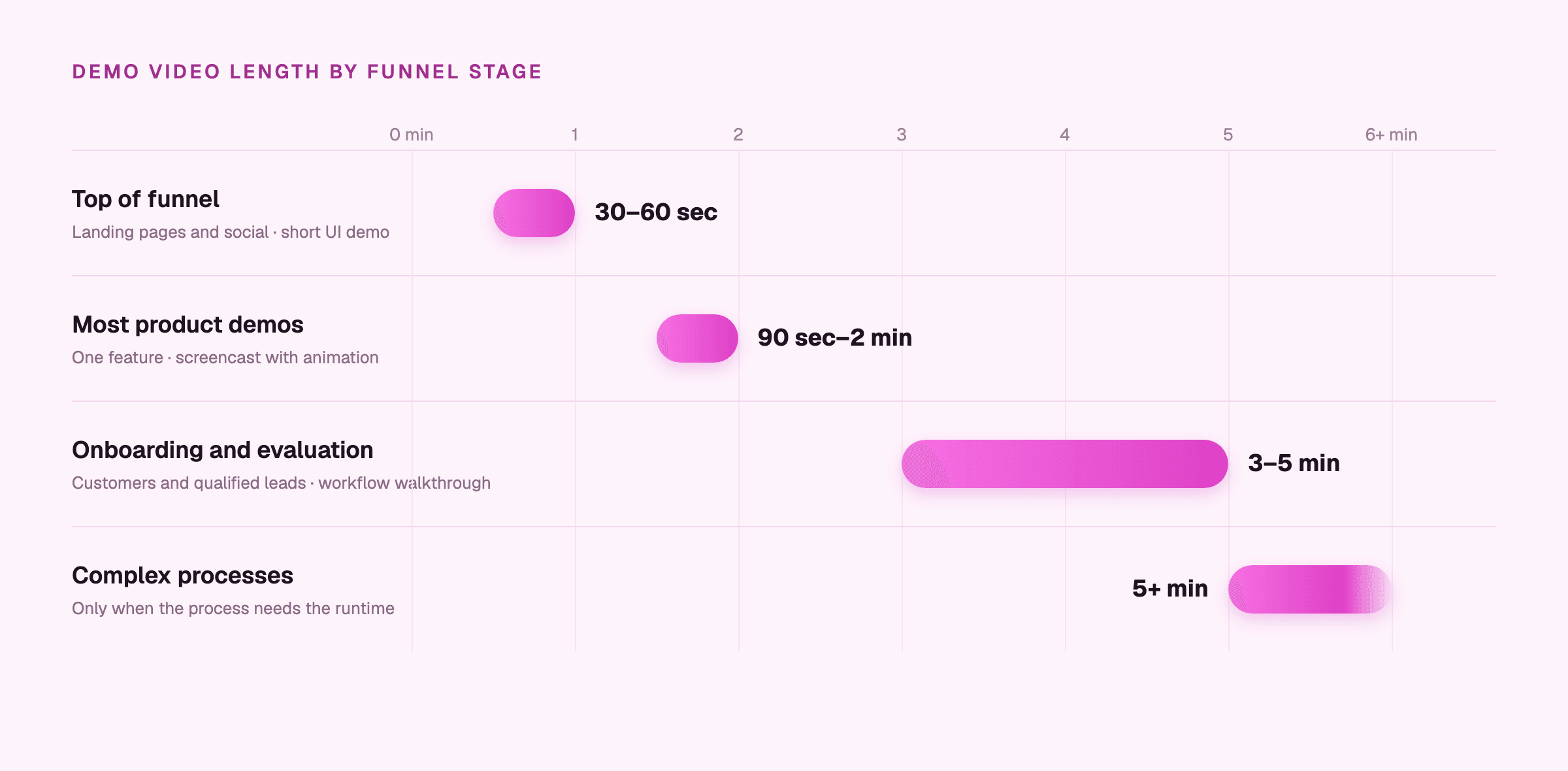
Once the structure is right, length and format stop being style choices. They become a contract with the viewer about how much of their attention a video has actually earned, and every second past that point risks breaking it. A 90-second video that respects the viewer's time protects the arc it just built. A five-minute video aimed at a cold audience destroys that same arc before it gets anywhere near the outcome.
Length ranges by funnel stage look roughly like this: 30 to 60 seconds for top-of-funnel awareness content on landing pages and social media; 90 seconds to two minutes as the range that fits most general demo videos; three to five minutes for onboarding or deeper workflow education aimed at existing customers or leads already qualified; and anything past five minutes reserved for processes that genuinely need that much runtime to explain.
For a first contact with a new prospect, stay nearer 60 to 90 seconds and push the deeper technical material into follow-up videos.
Format has to track the funnel stage the same way length does: a short UI demo or explainer for first contact and general awareness; screencast paired with animation when the goal is explaining a specific feature's capability; an interactive walkthrough for prospects deep into evaluation, who want to click around themselves; and a founder-led demo for B2B deals, where the deal often rests on trust in the people building the product as much as the product itself.
Pair the screen recording with simple animation when the value of a feature isn't visible in the interface, such as what happens in the background after a click. And for products where the output is the proof, like a design tool, opening on the finished result can carry most of the demo.
Why does audio matter more than visual polish in a demo?
Audio sets a viewer's gut read on professionalism within the first few seconds, and a bad recording can't be fixed in editing the way a bad shot can simply be cropped out. Viewers will sit through a slightly soft frame, but muffled or echoing narration makes them doubt the product before the first step is done.
Voiceover and subtitles aren't doing the same job, even though they often appear together. Voiceover carries pacing and emphasis, the things that make a walkthrough feel guided. Subtitles reach the viewer watching on mute, in a loud office, or in a second language. Use both, with captions kept short and tightly synced to what's on screen.
Background music plays a smaller, supporting role. It's not a substitute for clear narration. It works when it sets a tone without competing with the message. An upbeat track can keep the energy up, as long as it sits well below the narration.
What can AI handle in demo video production?
AI does its best work in the parts of demo production that eat time without adding anything to the story: cleaning up a script, generating voiceover, applying zoom, writing subtitles, clearing background clutter. These are mechanical tasks. They don't need a creative decision made fresh every time, and they're exactly where manual workflows lose the most hours for the least payoff.
For SaaS teams, the bigger problem is staleness. The moment the UI changes, a manually recorded demo is out of date. A demo built from an editable script and separate scenes can be updated without reshooting from the beginning.
That's why editability has become one of the main standards for judging a demo production tool, right alongside speed and localization.
Clueso's workflow shows what it looks like when AI handles the mechanical load and a person keeps the judgment calls. Record or upload a screen capture, let the AI rewrite the script and generate the voiceover, apply smart zoom and captions automatically. From there, the person running the project keeps control over the final result through branded templates, blur tools for sensitive information, and an article co-pilot that writes the accompanying documentation in the same session, not as a separate project started later.
That last point matters because a demo is often the clearest explanation of a product that a buyer, a new user, or an internal team member will ever see. If that's true, the same session that produces the video should also produce the written walkthrough that sits next to it in a help center or onboarding flow, instead of requiring a second round of work to document the same thing twice.
Build the demo in modules, with each scene able to be updated on its own. When a screen changes, a demo recorded in one take has to be redone from the start, while a modular one just needs the affected scene swapped out.
Should you localize your demo videos?
A demo library that only exists in English is missing something structural for any team with users outside English-speaking markets. Someone learning a product in a second language starts from behind, and no amount of visual clarity in the video fully closes that gap on its own.
Localization used to mean treating every language as its own separate project: a new voiceover recording, new captions, a whole new review cycle. Reaching a global audience is now a production decision available at the same tier as making the original English recording, not a separate initiative that has to compete for its own budget line.
Clueso's one-click translation into more than 150 languages puts that decision at the point of production. Global teams get the same quality of content, at the same time, as English-speaking users, instead of waiting weeks or months for a translated version to catch up.
This matters even more once a demo's job shifts from reaching prospects to educating existing users. A video explaining a new feature to a global user base is speaking to every language that user base actually uses, and an English-only library leaves a real share of those users without effective product education because it never reached them in a form they could use.
How do you measure whether a demo video worked?
What a demo gets measured by should come from the job it was built to do, not from whichever numbers happen to be easiest to pull off a dashboard. A top-of-funnel video and an onboarding video succeed on completely different signals. Running both through the same report will likely produce conclusions that are wrong for at least one of them.
The matching is practical. Onboarding videos should be judged on feature adoption, task completion, and support ticket volume in the weeks right after a user watches.
Where the call to action sits is a production decision too. Viewers drop off as a video plays, so a prompt after the end only reaches the people who stayed, while one placed right after the result lands when interest is highest. Your audience-retention graph shows how many viewers reach the end. That's why the placement decision belongs in the script, decided before a frame is shot, not left for whoever's handling distribution to bolt on at the end.
Updateability ties all of this together. A demo that can be measured accurately, updated cheaply when the UI changes, and pushed back out without a full new production cycle functions as a living record of the product, not a one-time asset that starts going stale the day it's published. That's the opposite of the expensive annual refresh that spends most of its lifespan describing a product that's already moved on.
Start with the demo on your homepage. Pause it at 30 seconds and run the three questions from the top of this guide. If it fails them, re-cut the opening scene around the problem your buyer has before you change anything else.
Frequently asked questions
How long should a software demo video be?
It depends on who's watching. Keep demos for cold audiences on landing pages and social to 30–60 seconds. Most general product demos fit in 90 seconds to two minutes. Onboarding and deeper workflow videos for qualified leads or customers can run three to five minutes. Go longer only when the process genuinely needs it.
What should a software demo video include?
Four things, in this order: the problem the viewer already has, the steps that solve it, a result they can see on screen, and the next action to take. Leave out any feature that doesn't serve that one problem and put it in its own video. A demo that covers everything usually explains nothing well.
Where should the call to action go in a demo video?
Usually inside the video, right after the viewer has seen the result, rather than after the video ends. Viewers drop off as a video plays, so an end-of-video prompt only reaches the ones who stayed. Decide the placement when you write the script, and check your retention graph to see how many viewers reach the end.
How do you keep demo videos up to date when the product changes every sprint?
Build each demo from separate scenes so a UI change means replacing one scene, not reshooting the whole video. In Clueso, you edit the changed line of the script and regenerate the AI voiceover, or re-record just the step that moved. Captions and zooms are rebuilt along with it.
Should a demo video use voiceover, captions, or both?
Both. They do different jobs. Voiceover carries the pacing and tells the viewer where to look. Captions reach people watching on mute, in a noisy office, or in a second language. Keep captions short and synced to what's on screen, and keep any background music well under the narration.
Can you make a software demo video without a video team?
Yes. Most of the hours in demo production go into mechanical work: cleaning up the script, recording narration, adding zooms, and writing captions. AI tools now handle those. In Clueso, you record or upload a screen capture, and it rewrites the script, generates the voiceover, and adds zoom and captions. You keep the decisions that need judgment.
Ashish Upadhyay
Senior Content Marketing Manager
Ashish is a Senior Content Marketing Manager at Clueso with 7+ years of experience across content, product, brand marketing. Now his mission is to help product and customer education teams realize the value of video-based learning. Outside of work, Ashish sketches, sings, plays the guitar, cooks, and does all things LLMs can't yet.