How to build an enterprise video production workflow for training at scale
How enterprise L&D teams produce and maintain hundreds of training videos: volume, brand, LMS tracking, updates, review, privacy, and security review.
TL;DR
- At enterprise scale, keeping videos accurate costs more than making them, so design the workflow around updates from the first video.
- Let the person who runs each process record it, keep the standards with a small central team, and put brand rules into templates rather than a style guide.
- For the LMS, check for SCORM 1.2, SCORM 2004, or xAPI, completion rules, and updates that don't need a re-upload. An embedded MP4 plays, but it isn't a tracked course.
- Review the video draft rather than a storyboard, and record in a sandbox with fake data so compliance has nothing to catch.
- Start the security review alongside the pilot, not after it.
Enterprise training teams rarely struggle with their first video. The trouble starts later, when there are 300 of them made by 15 different people, and the software they show changes every few weeks.
An operations lead at a payroll and HR software company recently described the moment it broke for them. Each month, his team mostly worked on updates to existing videos, and every update was done one video at a time.
Then the product team changed the banner at the top of every screen, which, as he put it, "wiped out my entire video library in one fell swoop."
That's the shape of the problem at enterprise scale in most organizations. Making a video is the easy part. Keeping hundreds of them accurate, consistent, approved, translated, and tracked in the LMS is where the hours go, and it's what enterprise L&D and education teams ask about most when they evaluate how they produce training video.
This guide takes those concerns one at a time: what to do about each, and where Clueso takes the work off your team.
What is an enterprise video production workflow?
An enterprise video production workflow is the documented sequence every video follows inside a large organization, from the request through recording, editing, review, branding, translation, publishing, and maintenance. It names an owner and a standard for each stage, so many contributors can produce videos at volume without each one inventing their own process.
How do you produce hundreds of training videos without a production team?
The question L&D leads put to AI assistants is usually some version of "50 employee training videos this month" or "500 onboarding videos this year, without manual editing." Hiring a bigger team rarely answers it. What works is moving each step to whoever can do it fastest: the person who runs the process records it, software handles the editing, and a small central team owns the standards.
Start with one intake form. Ask for the task the learner has to complete, the audience, the system and its version, the deadline, and the LMS course the video belongs to. If a requester can't name a single task, they're asking for a course, and it gets split into videos before anyone records. "How to approve a purchase order in SAP" is a video. "Procurement basics" is a module of six videos that learners will abandon halfway through.
Then let the subject-matter expert record, in a test account, talking through the task the way they'd explain it to a colleague. They don't need a script, and they shouldn't restart when they fumble a sentence. That rough narration can be cleaned up into a script and read by an AI voice, so the expert's own voice doesn't end up in a company-wide video, which is often the reason they say no. Generate the written step-by-step guide from the same recording too, so the job aid ships with the video instead of becoming a second project.
See how an AI voiceover turns a rough walkthrough into a narrated video, and how the same recording becomes a step-by-step guide.
Many enterprise teams work the other way round, with legal or compliance approving the script before anyone records. In that case, the approved script should be voiced word for word, so nothing drifts from what was signed off. It's worth testing that in any pilot.
Live training sessions are often the only record of how a process works, and nobody is going to sit through an hour-long recording to find one step. You can break those sessions into bite-sized videos and short guides, one per task, so each is easy to find and finish. And when a rollout needs 200 videos at once, building them one by one in an editor becomes the new bottleneck. Teams at that volume now describe the videos they need to an AI assistant and let it assemble them from the recordings and templates.
Turn long recordings into short task videos and guides with Clueso Cuts.
Read how Teamworks starts most of its videos in Claude through the Clueso MCP, and went from four to five hours per video to 20–30 minutes.
How can non-technical staff make videos that meet your brand standard?
Give 15 authors a PDF style guide and within a month you'll have 15 interpretations of it. A training lead at a healthcare software company described where that ends: "everybody was kind of editing a different way, so we had to establish a very specific source of truth." Another buyer's complaint about letting several people record was simpler: "different voices, different accents."
The fix is to put the standard where the video gets built, so authors don't have to remember it. Store your logos, colors, fonts, and tone of voice once and apply them automatically. Then template each type of video, with its intro, outro, layout, and pacing, so a new author in another office starts from the same structure as everyone else. Build one template per video type rather than one for everything, because a short how-to and a ten-minute process walkthrough need different ones. Narrating every video with the same AI voice also gives the library one consistent sound, whoever recorded it.
Set your brand once and template every type of video with Clueprints.
The central team should own four things and change them deliberately: the intake form, the templates, the glossary, and the review checklist. Everything else can be distributed. If brand consistency is your main concern, our guide to scaling branded training video production without a design bottleneck goes deeper on templates.
What LMS integration does enterprise training video actually need?
"Integrates with your LMS" can mean very different things. An MP4 uploaded to a course, or a video embedded in a page, will play, but it doesn't tell the LMS who finished it. For mandatory or audited training, you need a package the LMS can track. One sales enablement lead put the gap plainly: without it, "we can't check that they've watched 75% or 90%," so live sessions stay the only way to prove who was trained.
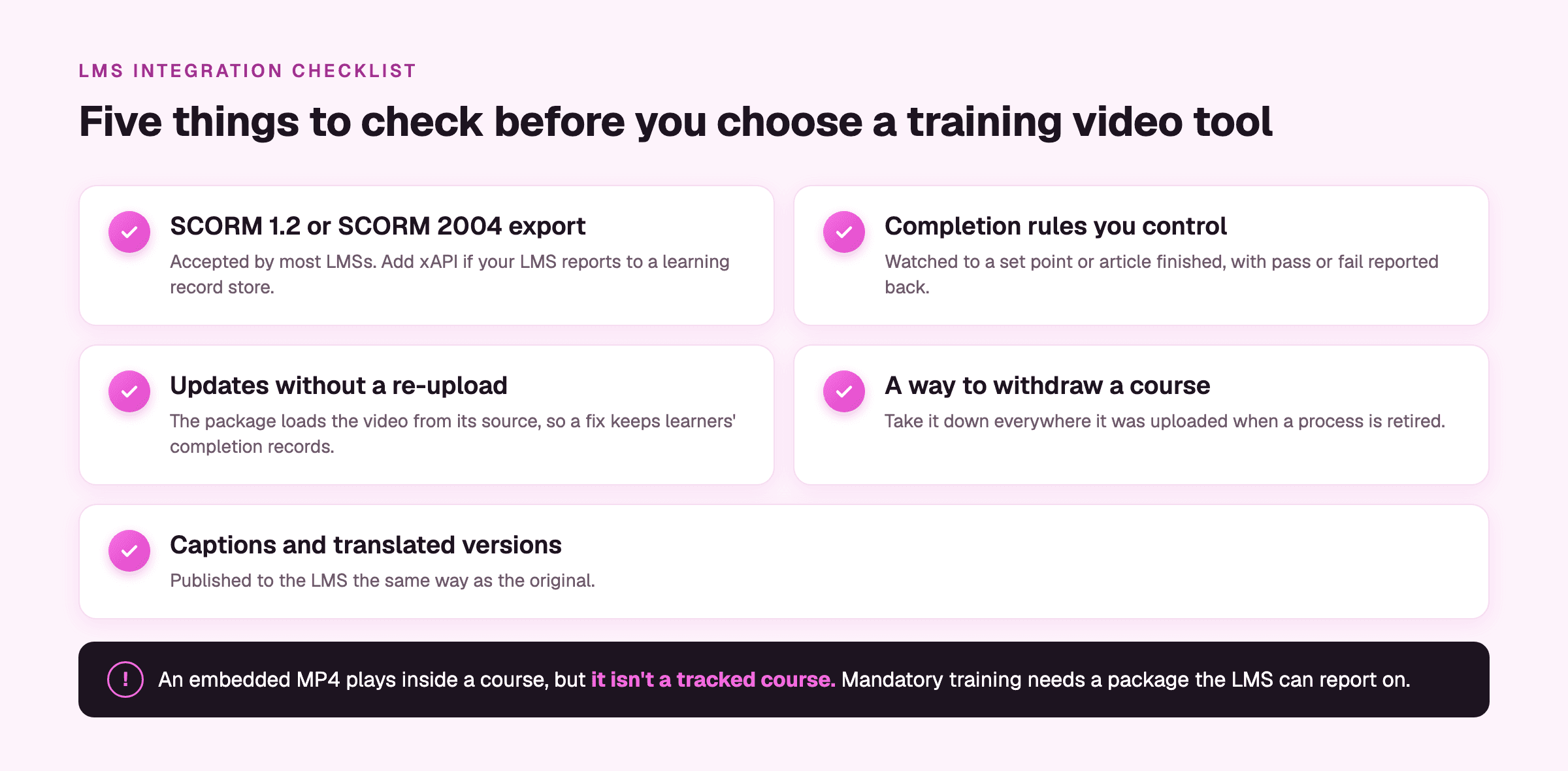
When you compare tools, check for five things:
- SCORM 1.2 or SCORM 2004 export, which most LMSs accept, and xAPI if your LMS reports to a learning record store.
- Completion rules you control, such as watching to a set point or finishing the article, with pass or fail reported back.
- Updates without a re-upload. If the package bundles the video file, every fix means a new package, a new upload, and sometimes reset completion records.
- A way to withdraw a course everywhere it was uploaded, for when a process is retired.
- Captions and translated versions published the same way as the original.
Export SCORM 1.2, SCORM 2004, and xAPI packages that update live courses without a re-upload (Enterprise plan). Our SCORM export walkthrough shows the setup.
Not everything belongs in the LMS. Lookup content works better where people already are: the help center, the internal portal, the Slack channel where the question comes up. Publish all of it from the same source, so one update reaches every place the video is embedded, and put anything internal behind a password, an email allowlist, or your own app's login.
Embed videos anywhere and they update in place when you publish a change.
How do you keep hundreds of training videos accurate when the software changes?
This is the concern that comes up most once teams are past the first batch. A customer education lead at a financial software company told us her team commits to updating videos within 30 days of a product change, and "we are probably 40% in meeting that." Another described the same cycle: "the more videos we do, the more stuff we have to maintain."
Three decisions keep maintenance small.
- Scope each video to one task, so a changed screen touches one short video instead of the middle of a long one.
- Make the owner of each video the owner of the system it shows, not whoever happened to record it.
- Route that system's release notes to the video owner the same day they reach IT, so nobody learns a video is wrong from a learner who followed it.
The fix itself should cost about as much as the change. For a renamed label, edit that line of the script and regenerate the voiceover for that one clip, keeping the previous version in case you need to roll back. Publish once, and every embed and LMS course built from the video picks it up. In a library of hundreds, the harder job is knowing which videos a release touched at all, and an agent watching your code repositories can now flag them for you.
Auto Updates connects to your GitHub, Bitbucket, or GitLab repositories and recommends which guides and videos a release affects (Enterprise add-on).
Our guide to keeping a training video library up to date covers the audit side, and updating one part of a training video covers the edit.
How do you get expert and compliance sign-off without endless review rounds?
In enterprise teams, reviewers usually outnumber the people making the videos. A training lead at a large consumer platform said it directly: "we have many more reviewers than the content creators." A program manager at a healthcare software company described her chain as the instructional designer, then herself as "managing editor," then "another set of technical eyes." Every round adds days, and the notes arrive scattered across email and Slack, like "the button label is wrong at 2:14."
Two changes shorten the loop. Name one approver per video on the intake form, so the final call belongs to one person. And review the video draft rather than a storyboard. A video lead at a networking company called storyboard-first review, where experts approve slides before anyone edits, "a lot of wasted work," because the approved slides still have to become a video that gets reviewed again.
Keep the feedback on the video itself. Comments pinned to the moment and the part of the screen they refer to mean the editor never has to hunt for "2:14," and flagging comments as outdated once a clip changes stops anyone re-checking a note that's already been handled. Give reviewers access that lets them comment without editing. As one enablement lead put it about subject-matter experts, "we don't want them breaking the video."
Review videos together with timestamped comments and a comment-only reviewer role.
How do you localize training for teams in other countries?
Translate only after a video is approved, or every review comment gets fixed once per language. For most enterprise teams, the slow part isn't the translation. It's everything around it: re-recording narration in each language, re-syncing it to the screen, and redoing captions, usually through a vendor that takes days to weeks per language.
Translating the whole project in one pass removes most of that work. The voiceover is regenerated in the new language, and the on-screen text, captions, and step-by-step article are translated with it, including right-to-left languages like Arabic and Hebrew. A shared glossary then holds the product names and field labels that must stay in English or translate a specific way, so each regional reviewer checks the glossary once instead of correcting the same term in every video. Have that reviewer start with the on-screen text, which is where mistranslations hide. Our post on localizing training and product videos covers the review step in detail.
Translate the voiceover, on-screen text, captions, and article into 150+ languages, with a translation glossary for your product terms.
Learn how Personio cut the time to produce a video in multiple languages from 5.5 days to two days.
How do you keep customer data out of training videos?
Training videos show real software, and real software shows real data. A trust and safety training lead described the worry plainly: a recording "might have user information or email or any other PII." In healthcare, the bar is HIPAA, and one training team told us their compliance group approves a list of fictitious names, addresses, and phone numbers that every recording has to use.
Start with the environment. Record in a sandbox or test account filled with approved fake data, so there's nothing for compliance to catch. Then add a safety net for what slips through. Blur sensitive fields while you record, before the footage ever reaches an editor, and let an automatic pass catch the emails, phone numbers, card numbers, and names you missed. Where a blurred box would look odd, swapping real values for realistic fake data keeps the screen looking like a working system. Footage recorded before any of this can still have faces and personal data blurred afterwards.
Auto-blur finds and hides personal data in recordings, and Magic Blur detects it while you record.
How do you get an AI video tool through security review?
Security review is often the longest stage of the whole evaluation. A training lead at a large consumer platform put the range at "anywhere between like two, three weeks to two, three months." Some companies won't let a team share any real material with a new tool until a contract is signed, and AI tools often face a separate AI-use approval on top of the usual vendor review.
So start the review on the first day of the pilot, not after the team has decided it likes the product. Run the pilot in a sandbox with fake data, so it doesn't need approval to touch real content, and send the vendor's security documentation to IT before the first recording.
Most security teams ask the same questions, so have the answers ready for the first email: SOC 2 and ISO 27001 reports, GDPR terms, single sign-on through your identity provider, role-based access that separates admins, editors, and reviewers, and where customer data is hosted.
Clueso is SOC 2 Type II and ISO 27001 certified and GDPR compliant, with SAML single sign-on and data hosted in US, EU, or Asia-Pacific regions. See Clueso for Enterprise.
How do you know the training library is being used?
Most L&D teams find out a video failed when the help desk tickets start arriving. Watch three numbers for each video instead: play rate, average play duration, and the point in the retention chart where viewers drop off. When viewers drop off at the same second across a video, that usually points to one confusing step, and that's the clip to fix first. Search data from your hosted content shows what people looked for and didn't find, which is your next list of videos to make. Export it next to your LMS completion reports so both sit in one view.
How long should an enterprise training video take to produce?
Count from request to published, not editing time alone. A rollout that needs 300 videos at eight hours each is 2,400 hours, which is more than a full-time employee's working year. The same 300 videos at 40 minutes each come to 200 hours. The gap between those two numbers is the business case for standardizing, and you can run it on your own backlog before talking to any vendor. If your current number is above four hours, recording and editing are where to look first.
See how Intellum's education team went from six to seven hours per video to one to two hours, and made 100+ videos for a certification course in three months.
Frequently asked questions
How do I scale corporate training video production?
Standardize the process before you add authors. One intake form, single-task videos, a shared template, and one approver per video let you add contributors without adding inconsistency. In Clueso, subject-matter experts record with the screen recorder, Clueso turns their rough narration into a script and an AI voiceover, and Clueprints apply your brand to every video. Teams producing in bulk build videos from Claude or ChatGPT through the Clueso MCP.
Can you create training videos from screen recordings without a video team?
Yes. In Clueso, one screen recording becomes both a polished video and a step-by-step guide. The expert talks through the task roughly, and Clueso writes the script, generates the AI voiceover, and adds zooms and captions, so nobody needs editing skills. A video team stays useful for filmed content, but you don't need one for software and process training.
Which steps of training video production can be automated?
Most of the editing. In Clueso, narration comes from AI voiceover, filler words and silences are cut automatically, zooms and captions are added for you, Clueprints apply the branding, the step-by-step guide is written from the same recording, and Magic Translate produces versions in 150+ languages. Clueso Cuts splits long sessions into short task videos, and Auto-blur hides personal data. Scoping, accuracy review, and deciding when a video is out of date still need a person.
How do you maintain and update video documentation at scale?
Assign each video to the owner of the system it shows, route that system's release notes to them, and keep videos short enough that a change touches one clip. With Clueso Agents, the owner then describes what changed, for example "the Approve button is now called Submit," and the agent edits the existing video: the script line, the voiceover, and the callouts. It doesn't regenerate the rest of the video, and every change can be reverted like any other edit. Publish once, and every embedded copy and LMS course picks up the new version. On the Enterprise plan, Auto Updates goes a step further: it watches your code repositories and flags which guides and videos a release affects, so the owner knows what to update before a learner finds the problem.
Is an embedded video enough for compliance training in an LMS?
No. An embedded video or uploaded MP4 plays inside a course, but it doesn't report who watched it. For training you need to track, export a SCORM or xAPI package with completion rules, so the LMS records who finished and whether they passed. On the Enterprise plan, Clueso exports SCORM 1.2, SCORM 2004, and xAPI packages that load from Clueso, so publishing an update fixes the live course without a re-upload and keeps completion records.
Will an AI video tool change our approved script?
It shouldn't, and it's worth testing in the pilot. If legal or compliance has signed off on a script, the tool should voice it as written. Clueso keeps a locked script word for word, and only rewrites narration when you start from a rough recording.
Ashish Upadhyay
Senior Content Marketing Manager
Ashish is a Senior Content Marketing Manager at Clueso with 7+ years of experience across content, product, brand marketing. Now his mission is to help product and customer education teams realize the value of video-based learning. Outside of work, Ashish sketches, sings, plays the guitar, cooks, and does all things LLMs can't yet.