Animated explainer videos are usually the wrong format for software
For software, animation is a layer, not a genre. Record the real product, and animate only the four things a screen recording genuinely can't show.
TL;DR
- An animated explainer for a software product is usually a re-creation of footage the company already has. The PM demo, the prospect demo, and the support walkthrough are all raw explainer material.
- Abstraction costs you recognition. A buyer evaluating software needs to see the screen they'll actually be looking at on Monday.
- Four things justify animation: concepts with no interface, data you can't show, states you can't reproduce, and time you need to compress.
- Animated explainers fail on style drift far more often than on concept — scenes that look like they came from different videos.
- The format decides your maintenance bill. A redrawn interface is obsolete the moment the interface changes, and you can't re-record your way out of it.
Before Movable Ink's enablement team consolidated its stack, the company's product managers were already recording 10-minute demos packed with great detail. Most of that raw material got used once, if at all.
The product had already been explained, on camera, by the people who knew it best, and the explanation was sitting on a drive doing nothing. In the same period the team ran four tools to make one piece of content: Camtasia for screencasts, Articulate Storyline for eLearning, and separate AI voice tools for narration and walkthroughs.
This shape of video production is everywhere, and it's why the animated explainer brief keeps getting written. Somebody senior asks for a video that explains the product. The screen recordings that already exist don't look like marketing, so nobody counts them. A studio gets a brief, and three weeks later a designer who has never opened your app draws an approximation of it.
My argument is narrow: for software, animation is a layer, not a genre. The default should be your real product on screen, with motion graphics used only where the recording genuinely can't carry the point.
An animated explainer video usually redraws a product you've already recorded
A software company generates explainer footage continuously as a byproduct of operating. Product managers record walkthroughs for internal handoff, and solutions consultants build a custom demo for one prospect that nobody ever opens again. None of it is polished. All of it contains the most expensive ingredient in an explainer: somebody who actually understands the product demonstrating it correctly.
The animated brief throws that away and starts over. The studio can't use the recording, because the recording is the thing being replaced. A designer reconstructs your interface in Figma, approximates your interaction patterns, and produces something that resembles your product the way a courtroom sketch resembles a defendant.
A useful check before you commission anything: ask whether anyone at the company has already recorded the thing you're about to pay to have drawn. The honest answer is usually yes.
SaaS explainer videos need to show the real product screen
The case for animation is that it simplifies. For consumer products and for abstract services, that usually works out — if you're explaining an insurance product, there's no interface to show, and a metaphor does real work.
Software is the opposite case. Your buyer isn't trying to grasp a concept. They're trying to work out whether this thing fits into their week, and that gets answered by seeing the real density of the real screen: how many fields are in that form, and whether it looks like it was built in 2015.
An animated approximation answers neither, and it sets up a failure that's hard to walk back. The prospect signs up, opens the product, and finds it doesn't look like the video. The video promised three clean panels; the app has a sidebar with 14 items. That gap reads as a bait and switch even when nobody intended one, and it lands at the exact moment you were hoping for activation.
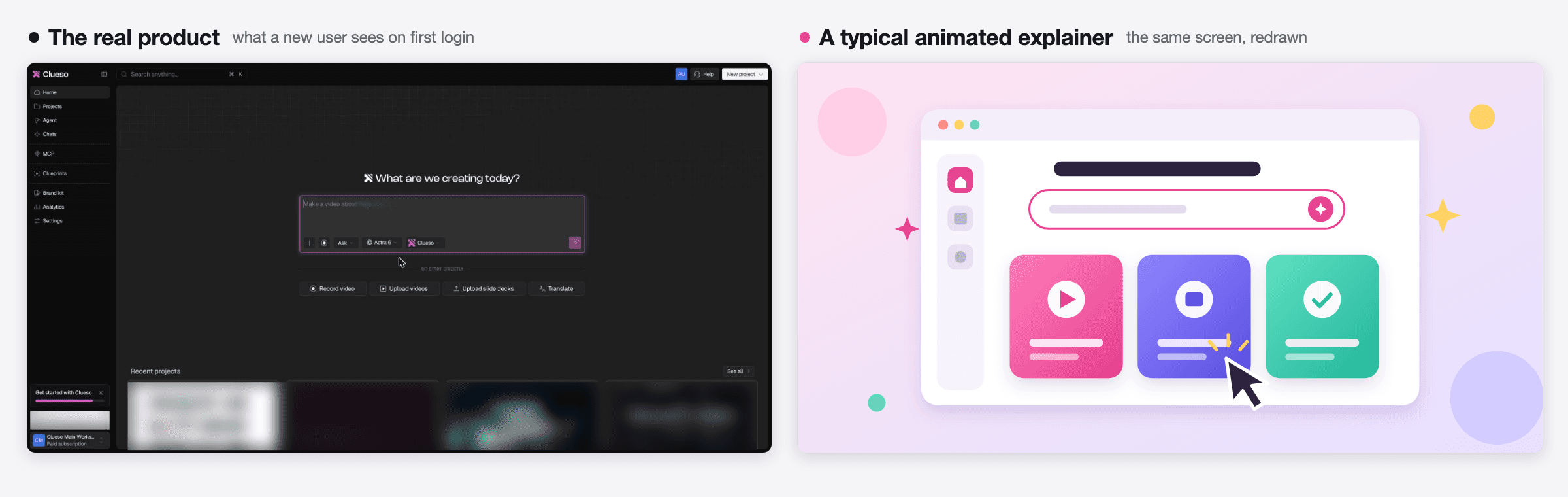
Our own published standard for building an animated explainer carries this as a rule rather than a preference. Under what to avoid, it lists faking the user's real product UI with invented mockups, and says that if the how-it-works beats need real interface, ask for screenshots and build around them. The instruction is to anchor on the real thing and animate around it.
Use motion graphics only for what a screen recording can't show
Rejecting the animated default isn't the same as rejecting animation. Motion graphics earn their place in four situations, and it's worth being strict about the list.
Concepts with no interface. Your architecture, your security model, how data moves between systems, what happens on the server after the user clicks. There's no screen to record, so a diagram that builds itself is the clearest option available.
Data you can't put on screen. Real accounts contain real customer names, real revenue figures, and real email addresses. Blurring is one answer and an animated chart is another, particularly when the point is the shape of the trend rather than the interface displaying it.
States you can't reproduce. The error nobody can trigger on demand, the dashboard that only looks impressive after six months of usage data, the edge case needing an account configuration you don't have. Animating a state is honest as long as it's labelled as illustrative.
Time you need to compress. A migration that runs overnight, or a workflow spanning four people over a week. Nobody can record that, and a timeline graphic compresses it without pretending the product is faster than it is.
Notice what's absent from that list: "the UI is ugly." If your interface is the problem, an animated explainer is an expensive way to postpone finding out, and the prospect discovers the truth during the trial anyway.
Everything outside those four cases should be your product, recorded, with motion sitting on top of it. Zooms, callouts, and polish direct attention inside a real recording. Motion graphics handle the transitions, the data, and the concept beats. Automatic blurring handles the account data you can't show. The result is a hybrid, and the hybrid is what most good software videos have quietly been for years. What makes a software demo video work covers the story order sitting underneath all of this, and how to create a product walkthrough video covers the task-level version.
Style drift ruins more animated explainer videos than weak scripts
The failure mode people expect from an animated explainer is a weak script or a confusing metaphor. The one that actually shows up is duller and more structural: the scenes don't look like they belong together.
A 90-second explainer runs seven to 10 scenes. Each gets generated or designed separately, often over weeks, sometimes by different hands. Scene two has a flat geometric style, scene five drifted toward soft gradients, and the line weights changed somewhere in the middle. No single scene is wrong. Watched end to end, the video feels assembled rather than made, and viewers register that as cheapness without being able to name it.
A recorded product video is immune to this by construction. Your interface already has one visual system, because a design team enforced it. You inherit consistency instead of manufacturing it.
If you do go animated, the defense is committing to one style recipe before generating anything — palette, one typeface, one illustration flavor, and one motion character — then describing that same recipe in every scene. That's a real discipline and worth the effort when animation is the right call. It's also an entire category of work that choosing a hybrid format skips. The motion graphics glossary entry covers the terminology if the studio conversation gets vague.
The real cost of an animated explainer video is updating it after every release
Every explainer carries a maintenance bill that nobody discusses at commissioning.
A redrawn interface is frozen at the moment the designer drew it. When you rename a feature or reorganize the navigation, the animated explainer is wrong, and your options are to pay the studio again or leave it wrong. Most teams leave it wrong. The video stays on the homepage, quietly teaching a version of the product that no longer exists, which is worse than having no video at all.
A recorded video has the same problem in principle and a much cheaper resolution in practice. Someone re-records the affected section, without a brief or a quote. The asymmetry matters more than it looks. A format you can fix in an afternoon actually gets fixed.
This is where the choice stops being aesthetic. If your product ships monthly, the animated explainer commits you to either a recurring studio relationship or a slowly decaying asset. Why product videos take so long gets into the mechanics of that cycle, and customer training videos built from product recordings covers what changes when the recording is treated as the source.
How Clueso turns a screen recording into a product explainer video
The hybrid format has historically been the expensive one, because it needed a screen recorder, an editor, a motion designer, and someone to keep the whole thing on brand. Collapsing those into one pass is the thing worth having.
At Clueso, the workflow runs from the recording outward. You record the real product with the screen recorder, the script gets written from what the recording actually did, AI voiceover replaces the narration nobody wants to record, and motion graphics get generated for the concept and data beats where the screen has nothing to show. Clueprints hold the brand decisions once, so consistency stops depending on one person remembering the rules.
What that buys shows up in the published numbers rather than the feature list. Movable Ink's team publishes 10 videos a month, up from five two years ago, on the same headcount, and a single video went from three days to half a day. [[SRC: customers/movable-ink]] The recording stopped being a rough draft that something else had to replace.
Frequently Asked Questions
Is an animated explainer ever the right choice for a software product?
Yes, in four cases: explaining a concept with no interface, showing data you can't put on screen, depicting a state you can't reproduce, and compressing a process too long to record. Outside those, record the product.
I want consistent motion graphics across a whole library of explainers without hiring an animator. What does that take?
It takes fixing the style decisions somewhere other than a person's memory — palette, typeface, illustration flavor, and motion character, applied as a template rather than re-specified per video. A library fails on drift between videos long before it fails on any single video.
I need to demo a dashboard, record the screen, and get captions and brand elements added. What workflow makes sense?
Record first, then write the script from the recording so it matches what the product actually did, then layer narration, captions, and branding. Scripting before recording is what produces videos describing a screen nobody is looking at.
How do I show real product data without exposing customer information?
Blur the sensitive regions in the recording, or replace the panel with an animated chart when the shape of the data matters more than the screen displaying it. Recording against a real account and masking afterward beats maintaining a sanitized demo tenant.
What about products that aren't visually interesting?
Interface quality is a product problem, and an animated explainer postpones the discovery rather than solving it. Prospects see the real thing during the trial. Tighten the recording's scope to the workflow that goes well instead.
Can a hybrid video look as polished as an animated one?
Polish comes from consistent typography, deliberate pacing, clean audio, and attention direction. All of those apply to a recorded video, which starts with a visual system your design team already enforces.
Take the last explainer brief your team wrote and find out whether a recording of that workflow already exists somewhere, in a PM's handoff folder or a solutions consultant's prospect demo. Then mark up the brief: for every beat, write either "record" or "animate," and make yourself justify each "animate" against the four cases above. Most briefs come back with one or two animated beats and the rest recorded, which is a different and much cheaper project than the one you were about to commission.
Ashish Upadhyay
Senior Content Marketing Manager
Ashish is a Senior Content Marketing Manager at Clueso with 7+ years of experience across content, product, brand marketing. Now his mission is to help product and customer education teams realize the value of video-based learning. Outside of work, Ashish sketches, sings, plays the guitar, cooks, and does all things LLMs can't yet.