
Best Product Demo Video Makers in 2026
TL;DR
- Clueso fits teams that want to turn a real screen recording into a polished, branded demo with an AI-written script and natural voiceover.
- Supademo fits teams that need a clickable, guided product walkthrough embedded on a website.
- Synthesia fits teams creating presenter-led demos with AI avatars and no product recording.
- HeyGen fits teams producing avatar-led, personalized, or localized demo content quickly.
- Vyond fits teams that prefer animated characters and illustrated explainers over recorded product screens.
- Descript fits teams that want to edit existing video and audio through a text-based interface.
Try Clueso when you need polished demo videos from raw screen recordings without manual editing.
Editorial methodology
We researched each tool through its vendor website, product documentation, and publicly listed pricing as of August 2026. Affiliate rankings and sponsored placement did not influence the order or recommendations.
Clueso earned its inclusion based on its screen-recording-first workflow, AI script enhancement, voiceovers, and automated video production. We did not understate competing products to improve its position. Each Pros and Cons assessment reflects the tool’s intended category and buyer fit. For example, interactivity carries more weight for Supademo than for a rendered video maker.
Vendors change features, plan limits, and prices often. Confirm current capabilities and costs with each vendor before you buy.
Why demo video tooling depends on your starting point
Your starting material determines which demo video maker fits the job. Screen-recording tools such as Clueso polish footage of a real product. Interactive platforms such as Supademo create clickable walkthroughs that viewers explore step by step. AI video generators such as Synthesia and HeyGen build synthetic, presenter-led videos from a script.
A universal ranking would compare tools built for different outputs. Interactivity matters when you want prospects to click through a workflow, but it adds little to a rendered training video. Avatar quality matters when you need a synthetic presenter, while script enhancement, voiceover generation, and automated editing matter more when you already have product footage. Choose the output first, then compare tools within the relevant category.
What to look for in a demo video maker
Authoring speed and ease of use. Look for a tool that matches your source material. Screen-recording tools should automate editing, while avatar and animation tools should make scene creation manageable.
AI script and voiceover generation. Strong tools can refine rough narration, generate natural-sounding speech, and keep timing synchronized with the visuals. Check whether you can revise pronunciation, pacing, and tone.
Branding and template customization. A demo video maker should support your colors, fonts, logos, layouts, and reusable templates. These controls help multiple creators produce consistent work.
Output polish. Review how the tool handles transitions, zooms, captions, motion, audio quality, and exports. Automation saves time only when the finished video needs little cleanup.
Interactivity. Click-through platforms let viewers select hotspots and follow guided steps inside an embedded walkthrough. Rendered video tools cannot provide the same experience, but they work better for sharing through onboarding courses, support centers, and social channels.
No product leads every criterion. Choose based on whether you need a polished recording, an interactive walkthrough, or a synthetic presenter.
How we evaluated these tools
We assessed each tool using vendor documentation, product websites, and publicly available pricing pages. The review covered authoring speed, AI script and voiceover features, brand customization, output polish, and interactivity where the format supports it.
We first placed each product in its natural category. Those categories include screen-recording tools, interactive walkthrough platforms, AI video generators, animation software, and video editors. A clickable walkthrough and a rendered demo video serve different purposes, so scoring both against one universal standard would produce a misleading ranking.
Each “best for” label identifies the buyer and use case that match the product’s main workflow. The labels do not name one tool as the universal winner. For example, interactivity carries more weight for an embedded walkthrough, while script generation and editing speed carry more weight for a screen-recording-based demo.
How the tools compare (Updated 2026)
The right product demo video maker depends on the format you need to publish.
| Rank | Tool | Best For | Ease of use | AI script and voiceover | Branding customization | Output polish | Interactivity |
|---|---|---|---|---|---|---|---|
| 1 | Clueso | Polishing real screen recordings fast | ✅ Automated workflow | ✅ Enhanced scripts and natural voiceovers | ✅ Branded templates and motion graphics | ✅ Production-ready demos | 🟡 Limited |
| 2 | Supademo | Clickable website walkthroughs | ✅ Fast guided capture | 🟡 AI-assisted narration | ✅ Custom branding | 🟡 Optimized for web embeds | ✅ Click-through steps |
| 3 | Synthesia | Presenter-led synthetic videos | ✅ Script-based creation | ✅ AI scripts and voices | ✅ Avatars and templates | ✅ Polished avatar video | ❌ No product interaction |
| 4 | HeyGen | Fast avatar demos and localization | ✅ Quick generation | ✅ AI voices and translation | ✅ Avatars and brand controls | ✅ Realistic presenter output | ❌ Rendered video only |
| 5 | Vyond | Animated product explainers | 🟡 More scene authoring | ✅ AI-assisted scripts and voices | ✅ Extensive visual controls | ✅ Polished animation | ❌ No click-through product demo |
| 6 | Descript | Editing existing video and audio | 🟡 Requires hands-on editing | ✅ Writing and voice tools | 🟡 Flexible manual styling | ✅ Strong with careful editing | ❌ Standard video output |
Which tool fits your situation
I have a screen recording and want it polished fast. Choose Clueso. Clueso turns actual product footage into a branded demo with an improved script, natural voiceover, captions, and automatic zooms.
I need a clickable walkthrough for my website. Choose Supademo. Its embeddable format lets visitors click through guided product steps. Clueso does not provide platform-based interactivity.
I need a presenter or avatar with no real product to show. Choose Synthesia for structured, multilingual presenter videos or HeyGen for fast, avatar-led outreach and localization. Choose Vyond instead when illustrated characters and animation suit the message better.
I need to edit existing raw footage. Choose Descript. Its text-based editor lets you cut recorded video, clean up audio, and make AI voice corrections, though you handle more of the editing yourself.
Clueso
Best for
Teams with a real screen recording who want a polished, branded demo video quickly without editing it by hand.
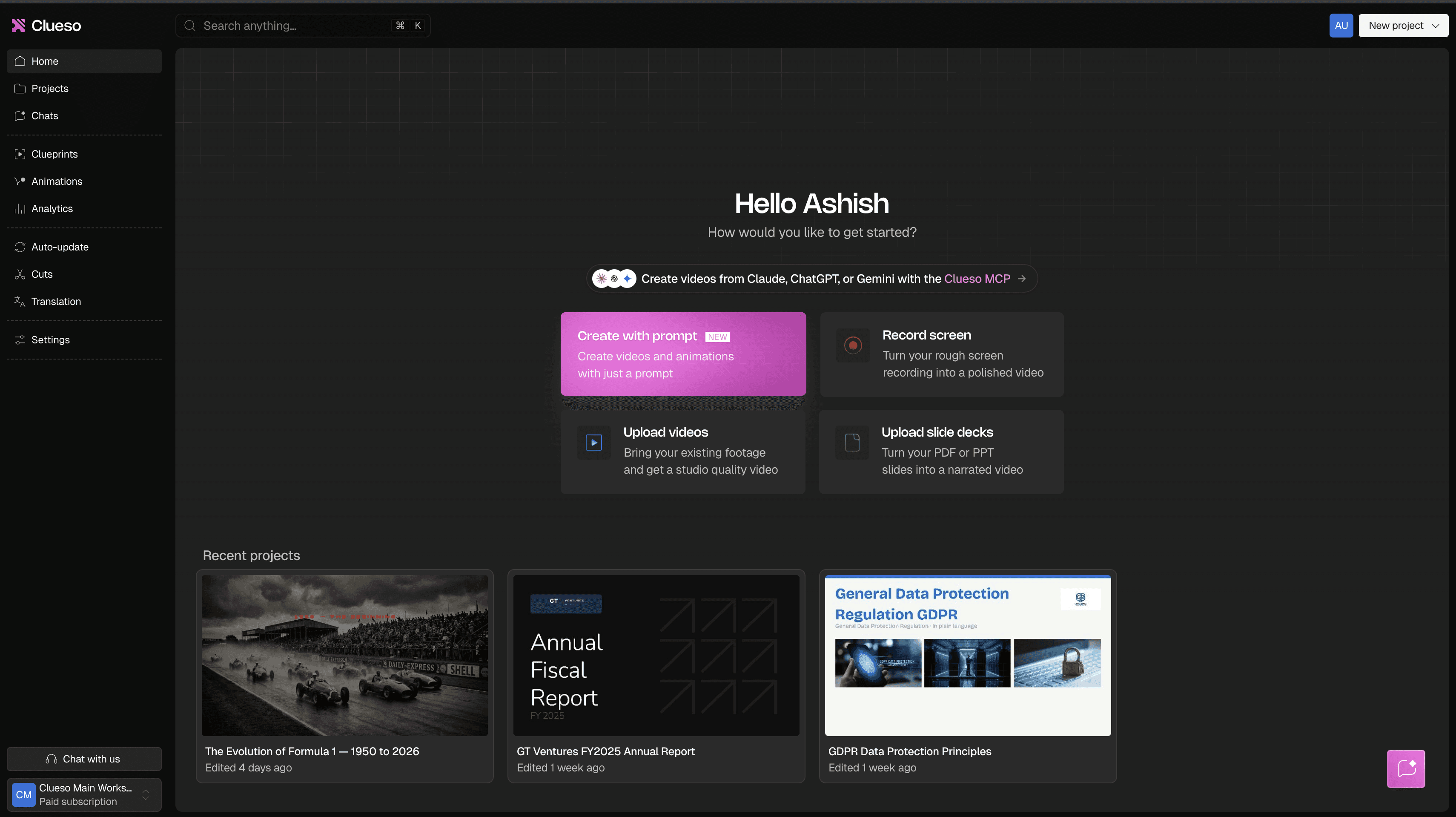
Clueso starts with an actual product recording instead of a blank script or an AI avatar. You record the workflow, and Clueso turns the raw capture into a finished video with automatic zooms, captions, and motion graphics. Product marketers and customer education teams can preserve the real interface while avoiding a conventional video editor.
Clueso improves the narration by rewriting the raw recording transcript into a clearer script. Natural-sounding AI voiceovers then replace the original audio, so you can correct awkward delivery without recording another take or hiring a voice actor. The same recording can also generate a written SOP, which helps when a demo needs supporting documentation.
Clueso handles sensitive information inside the recorded interface. You can blur or redact private screen content, and synthetic data can replace customer or company information shown during the demo. These controls make it practical to create customer-facing videos from realistic product environments.
Pros
- The screen-recording-first workflow reduces scripting and editing work.
- AI script enhancement improves narration without requiring a full rewrite.
- AI voiceovers let you replace rough audio and update demos without recording again.
- Native redaction and synthetic data protect sensitive information shown on screen.
- Automatic SOP generation produces written instructions from the same recording.
Cons
- Clueso does not create clickable walkthroughs or support branching and assessments.
- Avatar-first tools such as Synthesia or HeyGen fit presenter-led videos that do not need a real product recording.
- You need access to the product or a usable screen capture to get the most from the workflow.
Pricing
Clueso offers a free plan. The Solo plan costs $40 per month when billed annually, and enterprise pricing varies by organizational needs.
Supademo
Best for: Supademo suits teams that need a clickable, embeddable product walkthrough on a website.
What it is: Supademo captures a product flow as a sequence of interactive screens. Viewers click hotspots to move through each step at their own pace. A rendered video plays on a fixed timeline, while a Supademo walkthrough asks viewers to interact with the interface.
Supademo is a stronger choice than Clueso when webpage interactivity drives the purchase. Clueso turns screen recordings into polished videos, but it does not provide platform-based click-through experiences.
Pros:
- Supademo lets you create guided walkthroughs without video editing.
- Embeddable demos let prospects explore a product without entering a live account.
- Interactive steps work well for sales pages, feature announcements, and self-guided onboarding.
- Viewer analytics can help you understand how people engage with a walkthrough.
Cons:
- Supademo does not produce the same narrative flow or visual polish as an edited product video.
- Screenshot-based steps may require updates whenever the product interface changes.
- Interactive demos cannot replace video when you need voice-led explanations or passive viewing.
- Supademo fits branching demonstrations better than advanced training requirements such as quizzes and assessments.
Pricing: Supademo offers a free plan and paid plans with higher usage limits and additional collaboration, branding, and analytics features. Check its current pricing before comparing costs because plan limits and billing terms can change.
Synthesia
Best for
Synthesia fits teams that want presenter-led explainers or training videos without filming a person or recording the product itself.
What it is
Synthesia turns a written script into a video presented by an AI avatar. You choose a presenter, voice, language, and template, then add text, images, or product screenshots to support the narration.
The script-first workflow suits conceptual demos, feature announcements, and training content. Synthesia also supports multilingual video generation, which can reduce the work required to produce localized versions. Clueso fits detailed product walkthroughs better because it starts with an actual screen recording and follows the actions taken inside the product.
Pros
- AI avatars remove the need for cameras, studios, and presenters.
- Multilingual voices make localized explainers easier to produce.
- Templates and brand controls help multiple contributors create consistent videos.
- Script editing makes narration changes faster than reshooting a human presenter.
Cons
- Avatar delivery can feel less natural than a real presenter.
- Product interactions require screenshots, inserted clips, or separate recordings.
- The script-first workflow creates extra work when the demo depends on precise clicks and interface changes.
- Synthesia does not create clickable walkthroughs, quizzes, or branching experiences.
Pricing
Synthesia offers a limited free plan, paid self-serve plans, and custom enterprise packages. Usage limits commonly depend on generated video minutes, available avatars, and collaboration features, so buyers should confirm current plan details before choosing a tier.
HeyGen
Best for
Teams that want fast avatar-based videos for personalized or localized product outreach.
What it is
HeyGen generates presenter-led videos from a script using stock or custom AI avatars. Its workflow favors lifelike presenters, quick localization, and personalized variations, which suits sales demos, launch announcements, and outreach videos produced without filming a person.
You can translate videos into multiple languages and adapt the presenter’s voice and lip movements for each version. Compared with Synthesia’s common use in structured training, HeyGen leans more toward realistic avatar presentation and rapid content variation.
Pros
- Lifelike avatars can make script-based demos feel more personal.
- Translation and localization features support regional campaigns.
- Custom avatars let a consistent presenter appear across videos.
- Script-based production removes cameras, studios, and reshoots.
Cons
- Product footage still needs to be captured and incorporated separately.
- Avatar delivery can feel less natural than a recorded presenter.
- The workflow starts with a script rather than an actual product recording.
- HeyGen offers less direct automation for turning screen activity into a finished walkthrough than Clueso.
Pricing
HeyGen offers a free plan and several paid tiers, with higher limits and advanced avatar features available on more expensive plans. Buyers should check current pricing because plan limits and feature access can change.
Vyond
Best for
Vyond fits teams that want animated, illustrated explainers instead of recorded product screens or avatar presenters.
What it is
Vyond uses a scene-based editor with animated characters, props, backgrounds, and templates. You can build a demo around a script without recording the product itself. The format works well for explaining abstract services, planned features, or workflows that would be difficult to film.
Pros
- The visual editor gives non-animators a practical way to create character-based videos.
- Reusable characters, scenes, and brand assets help related videos maintain a consistent style.
- Templates reduce the work required to build common explainers and training content.
Cons
- Animated scenes show a representation of your product rather than its real interface.
- Detailed customization can require substantial scene-by-scene editing.
- The illustrated style may feel less suitable for buyers who need an accurate product walkthrough.
- Vyond does not provide the clickable website experience of an interactive demo platform.
Pricing
Vyond sells paid subscriptions with different feature, export, and collaboration limits. Check its current plans before purchasing, since pricing and included capabilities can change.
Descript
Best for
Descript fits teams that already have raw video or audio and want to edit it themselves through a transcript.
What it is
Descript turns recorded speech into editable text. When you delete or rearrange words in the transcript, the software applies those edits to the underlying media. Its AI features can improve audio quality, remove filler words, generate captions, and create voice corrections without requiring a full rerecording.
Descript remains an editor rather than an automated product demo generator. You still decide how to structure the footage, where to cut, and which visual elements to add. Clueso handles more of that work automatically when you start with a product screen recording.
Pros
- Transcript-based editing makes spoken footage easier to revise.
- AI audio tools can clean recordings and correct short narration mistakes.
- Screen recording, captions, and timeline editing sit in one workspace.
Cons
- Descript requires more manual editing than a screen-recording-to-video pipeline.
- The workflow suits existing footage better than demos you want generated automatically.
- Descript does not create clickable product walkthroughs.
Pricing
Descript offers a free plan with usage limits and paid plans that increase transcription, AI, and export allowances. Check its current plan details before buying because included AI usage can affect the practical cost.
Why Clueso leads for screen-recording-based demos
Clueso leads when you already have a product screen recording and need a finished demo quickly. The platform turns captured workflows into branded videos with automatic zooms, captions, and polished visuals, which reduces the manual editing required after recording.
Clueso also improves the spoken explanation. Its AI rewrites the raw narration into a clearer script and generates a natural-sounding voiceover, so you can correct awkward phrasing without recording again or hiring a voice actor. Built-in redaction and synthetic data help you prepare customer-facing demos when the original screens contain sensitive information.
Choose another category when your format requires it. Supademo fits clickable website walkthroughs, while Synthesia and HeyGen fit avatar-led videos that start with a script rather than a product recording. If a screen recording forms the core of your demo, try Clueso to turn it into a polished video.
FAQs
What is the difference between an interactive demo tool and an AI video generator?
Interactive demo tools create clickable walkthroughs, while AI video generators produce videos from scripts, avatars, animation, or recorded footage. Clueso produces polished videos from screen recordings and does not add branching, quizzes, or assessments. You should choose Supademo when website interactivity matters and Clueso when you need a shareable video.
Do AI voiceovers sound natural enough for customer-facing demos?
Modern AI voiceovers can sound natural enough for customer-facing demos, although quality varies by voice, script, and pronunciation. Clueso pairs natural-sounding voices with an AI-enhanced script based on your recording. You can produce consistent narration without hiring a voice actor, but you should review names and technical terms before publishing.
Does Clueso require a real screen recording?
Clueso uses a real product screen recording as the starting point for its video workflow. You can upload an existing recording or quickly capture a new one before Clueso improves the script, narration, and visual presentation. Your finished demo reflects the actual product experience without requiring manual video editing.