Trupeer turns screen recordings into how-to videos and SOPs. Clueso does that too, and it also builds videos from a prompt, a script, a doc, a slide deck, or a URL, with motion graphics, AI voiceover, and a step-by-step guide alongside.
You can edit any part of it by chatting with the Clueso Agent, or by hand on a full timeline. Here's how the two compare.
## What's better in Clueso than Trupeer ## The questions feature lists don’t cover ## Clueso vs Trupeer: Which one is for you? ## Frequently asked questions ### How is Clueso different from Trupeer? Trupeer turns screen recordings into videos and SOPs. Clueso is an agentic video platform: it builds videos from a prompt, a script, a doc, a deck, a URL, or a recording, generates motion graphics and animation, and writes the step-by-step guide alongside. You edit by chatting with the [Clueso Agent](https://www.clueso.io/features/clueso-agents) or by hand on a multi-track timeline. ### Can I make a video in Clueso without recording anything? Yes. Describe the video you want, or hand Clueso a script, a [slide deck](https://www.clueso.io/features/ppt-video), a [PDF](https://www.clueso.io/tools/pdf-to-video-converter), or a URL. It writes the script, generates the voiceover, and builds the visuals, including [motion graphics](https://www.clueso.io/features/motion-graphics). Trupeer's doc and deck to video is Enterprise only, and it has no prompt-to-video. ### Does Clueso need a Chrome extension like Trupeer? Clueso records through a Chrome extension too. It can capture a browser tab, an app window, or your whole screen, so desktop apps work as well. You can also upload recordings you already have, or skip recording and start from a prompt, a doc, or a deck. ### What happens when my product changes? With a GitHub repository connected, Clueso's agents flag the videos a code change has made outdated and regenerate them. [Auto Updates](https://www.clueso.io/features/auto-updates) is an Enterprise add-on. On any plan, you can re-record only the screen that changed and drop the new clip into the existing video. Trupeer has no way to flag which videos are out of date. ### Can I create Clueso videos from Claude or ChatGPT? Yes. The [Clueso MCP](https://www.clueso.io/mcp) lets Claude, ChatGPT, Cursor, and Claude Code create and edit Clueso videos and guides, and it's on every plan. Trupeer's MCP server only searches your knowledge base, and it's on the Enterprise plan. ### Is Trupeer cheaper? No. Both start at $40 a month billed yearly. Clueso's Solo plan includes doc and deck to video and translation, which Trupeer reserves for higher tiers, and Clueso has a free plan where Trupeer offers a 10-day trial. See [Clueso pricing](https://www.clueso.io/pricing). ### Can I bring my existing Trupeer videos into Clueso? Yes. Upload a recording and Clueso turns it into an edited video with an AI voiceover and a step-by-step guide. From there you can restyle it with a Clueprint, translate it, or keep editing by chat. ### How you create | Feature | Clueso | Trupeer | | --- | --- | --- | | Create a video from a prompt or a script | ✓ | ❌ | | Turn a PPT, PDF, or Word doc into a video | ✓ | Enterprise | | Build a video from a website URL | ✓ | ❌ | | Record your screen or upload a recording | ✓ | ✓ | | Create and edit videos by chatting with an AI agent | ✓ | ❌ | | Create and edit videos from Claude, ChatGPT, or Cursor (MCP) | ✓ | ❌ | | Clueprints: reusable blueprints for structure, brand, and editing style | ✓ | ❌ | | Agents update videos when your product changes | Enterprise add-on | ❌ | ### Video creation features | Feature | Clueso | Trupeer | | --- | --- | --- | | Process capture and step detection | ✓ | ✓ | | Multi-track timeline with keyframes | ✓ | ❌ | | AI motion graphics, logo animation, and animated charts | ✓ | ❌ | | Stock video, images, and music | ✓ | Music only | | AI script from your narration | ✓ | ✓ | | AI voiceovers | ✓ | ✓ | | Audio tags for expressive voiceover | ✓ | ❌ | | Pronunciation dictionary | ✓ | ✓ | | AI avatars | ✓ | ✓ | | Audio-video sync | ✓ | ✓ | | Background music | ✓ | ✓ | ### Documentation features | Feature | Clueso | Trupeer | | --- | --- | --- | | Step-by-step guide from every video | ✓ | ✓ | | Edit the guide by chatting with AI (article copilot) | ✓ | ❌ | | Screenshots | ✓ | ✓ | | Turn screenshots into GIFs | ✓ | ❌ | | Export formats | HTML, PDF, Markdown, DOCX, rich text | DOC, PDF, Markdown | ### Editing and localization | Feature | Clueso | Trupeer | | --- | --- | --- | | Brand kit | Every plan | Scale plan and up | | Zoom effects | ✓ | ✓ | | Callouts and spotlights | ✓ | ❌ | | Annotation and blur | ✓ | ✓ | | Translation into 150+ languages | Every plan | Scale plan and up | ### Enterprise features | Feature | Clueso | Trupeer | | --- | --- | --- | | Security compliance | SOC 2, ISO 27001 | SOC 2, ISO 27001 | | Shared team workspace | ✓ | ✓ | > ## Creating with AI ### Can I make a video without recording my screen? **Yes, in Clueso. Trupeer needs a recording on most plans.** Clueso builds a video from a prompt, a script, a document, a [slide deck](https://www.clueso.io/features/ppt-video), a [PDF](https://www.clueso.io/tools/pdf-to-video-converter), or a website URL. It writes the script, generates the voiceover and visuals, and hands you a draft you can refine. Trupeer starts from a screen recording. Its Doc to Video feature, which turns DOC, PDF, and PPT files into videos, is on the Enterprise plan only, and it has no prompt-to-video. ### Can it create motion graphics and animation? **Yes, in Clueso. Not in Trupeer.** Clueso generates [motion graphics](https://www.clueso.io/features/motion-graphics) from a prompt: animated logos, charts and infographics, kinetic text, and custom scenes. Each one lands on the timeline as an editable element, so you can change the wording or the timing without generating it again. A stock library of video, images, and music sits in the same editor. Trupeer has no motion graphics or animation generator, and its built-in library covers background music. ### Can I edit a video by chatting with AI? **Yes, in Clueso. Trupeer's AI only rewrites the script.** The [Clueso Agent](https://www.clueso.io/features/clueso-agents) creates and edits videos and guides from plain-language requests, like "shorten the intro" or "add a callout on the export button." It shows you each change, and you can undo a whole turn in one click. You can also work from Claude, ChatGPT, or Cursor through the [Clueso MCP](https://www.clueso.io/mcp). Trupeer's Rewrite with AI changes the script from a prompt. Its MCP server searches your knowledge base and can't create or edit a video. ### Can every video follow the same structure and style? **Yes, with Clueprints in Clueso.** [Clueprints](https://www.clueso.io/features/clueprints) are reusable video blueprints. Each one carries a layout, branding, tone, and editing style, so a video made by a new teammate comes out looking like one made by your best editor. Community Clueprints are on every plan, and custom ones are on Enterprise. Trupeer's Skills save settings such as voice, music, captions, and auto-zoom on its Scale plan and up. It has no ready-made video template library. ### What happens when my product changes? **Clueso's agents keep videos current. In Trupeer, you find the stale ones yourself.** With a GitHub repository connected, Clueso's agents flag the videos a code change has made outdated and regenerate them. [Auto Updates](https://www.clueso.io/features/auto-updates) is an Enterprise add-on. On any plan, you can re-record only the screen that changed, drop the new clip into the existing video, and edit the script to regenerate the voiceover. Trupeer lets you swap one recording inside a merged walkthrough, but nothing tells you which videos are out of date. > ## Video creation ### Can I record my product or workflow step by step? **Yes, in both tools.** Both Clueso and Trupeer include an inbuilt screen recorder and support process capture with step detection. So, you can record your on-screen product or process easily. ### How strong is the video editing experience? **A full timeline in Clueso. Scene edits in Trupeer.** Clueso automates the first draft: it writes the script, generates the voiceover, adds zooms and callouts, and keeps everything in sync. You then get a multi-track timeline with keyframes, so you can move, animate, and retime any element by hand. Trupeer's editor trims, splits, and reorders scenes and adds transitions. It has no keyframes or layered animation, which makes it restrictive when a video needs more than cleanup. ### Do I need to write a script manually? **No, both tools support AI script generation from videos and speech-to-text transcription.** While recording your screen on Clueso, you can simply explain the actions in your own words. Do not worry if its clunky or full of pauses or filler words. Clueso generates a polished [AI enhanced script](https://help.clueso.io/voiceovers/ai-rewrite)from your raw narrations. If you need to edit it further, you can do it manually or using custom prompts. Trupeer auto-refines your script by removing filler words and enhancing grammar and vocabulary. You can also adapt the script in different styles. ### What about voiceovers and narration control? **Both tools support AI voiceovers, but only Clueso offers deeper control.** Clueso generates natural sounding [AI voiceovers](https://www.clueso.io/features/ai-voiceovers) in 150+ languages. You can fine-tune delivery using simple voice tags, such as adding pauses, emphasis, or excitement, so the narration matches the moment. This is especially useful when the voice needs to carry emotion without relying on facial expressions. Clueso also offers a [pronunciation dictionary](https://help.clueso.io/voiceovers/pronunciations) so that you can specify how AI pronounces specific terms. [Watch the video](https://www.youtube.com/embed/ahqv91g9QXE?iv_load_policy=3&rel=0&modestbranding=1&playsinline=1&autoplay=0&mute=1) Trupeer offers AI voiceovers across multiple languages. They also have a custom pronunciation feature to specify how particular words are pronounced. But there are no controls available for fine-tuning tone, pacing, or delivery. ### Do audio and visuals stay in sync when I edit? **Yes, in both tools.** With Clueso, [audio and video stay aligned automatically](https://help.clueso.io/sync-points/introduction). So, you do not need to worry about it when you edit the script, trim clips, or add new sections. You can add sync markers inside scenes, so you can fine-tune timing. Trupeer’s Add Audio to Video tool automatically detects scenes and syncs the audio. It ensures your narration, background music, or effects play seamlessly without manual syncing. ### Can I use AI avatars if I want to? **Yes, both tools support AI avatars.** Both Clueso and Trupeer offer a range of realistic [AI avatars](https://www.clueso.io/features/ai-avatars). In Clueso, you can place an avatar over a screen recording, a slide, or an animated scene, and style its frame and background. ### Can I upload existing videos and reuse them? **Yes in both tools.** Both Clueso and Trupeer support uploading existing videos. You can simply reuse them to create new content pieces. ### Can I convert slides or documents into videos? **On every Clueso plan. On Trupeer's Enterprise plan only.** Clueso turns a [slide deck into a video](https://www.clueso.io/features/ppt-video) using your speaker notes, or by reading the slides when there are no notes. It also converts [PDFs](https://www.clueso.io/tools/pdf-to-video-converter) and Word documents, and it can split slide objects into separate elements you can animate. Trupeer's Doc to Video converts DOC, PDF, and PPT files into narrated videos, but only on its Enterprise plan. > ## Step-by-step guide creation ### Can it convert videos into written step-by-step guides? **Yes, in both tools.** Both tools can generate written step-by-step guides from videos. Clueso turns your video recording into full step-by-step [documentation](https://www.clueso.io/features/help-articles), complete with screenshots, action descriptions, and instructional text. Trupeer generates written documentation with sections, contextual steps, and screenshots. ### Will the tool help me edit and improve my help articles & SOPs? **Clueso can, Trupeer cannot.** With Clueso’s Article [Co-pilot](https://help.clueso.io/article/article-copilot), you can edit your articles and screenshots for better clarity and structure. You can either set up predefined instructions for all documentation upfront, like tone, structure, level of detail, and formatting rules, or use chat-based questions for real-time help. 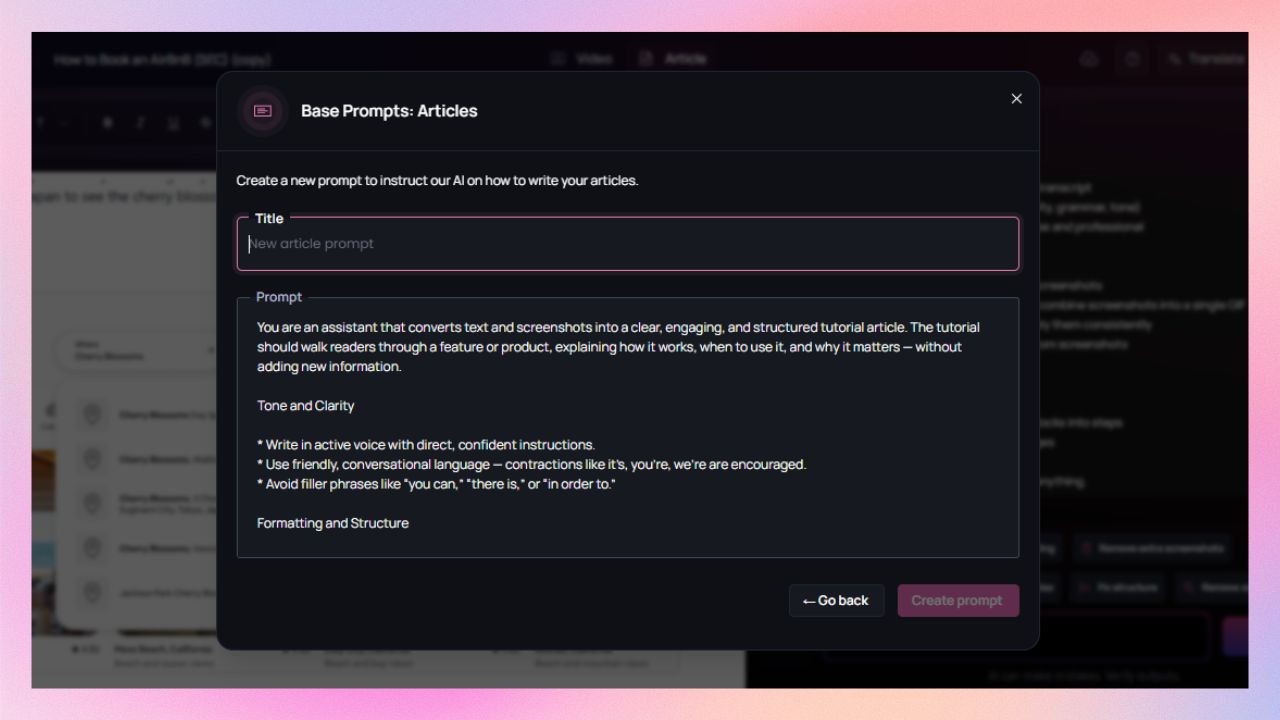 Trupeer doesn’t offer any assistance for editing or improving the written documentation. ### Can I generate screenshots and GIFs? **Yes, with Clueso. Not with Trupeer.** Clueso captures [screenshots](https://help.clueso.io/article/screenshots/add-screenshots) automatically as a part of the documentation workflow. It can convert a set of screenshots into [GIFs](https://help.clueso.io/article/screenshots/screenshot-gif). It keeps the cursor movement and highlights intact which works well for quick how-tos, release notes, and inline help. 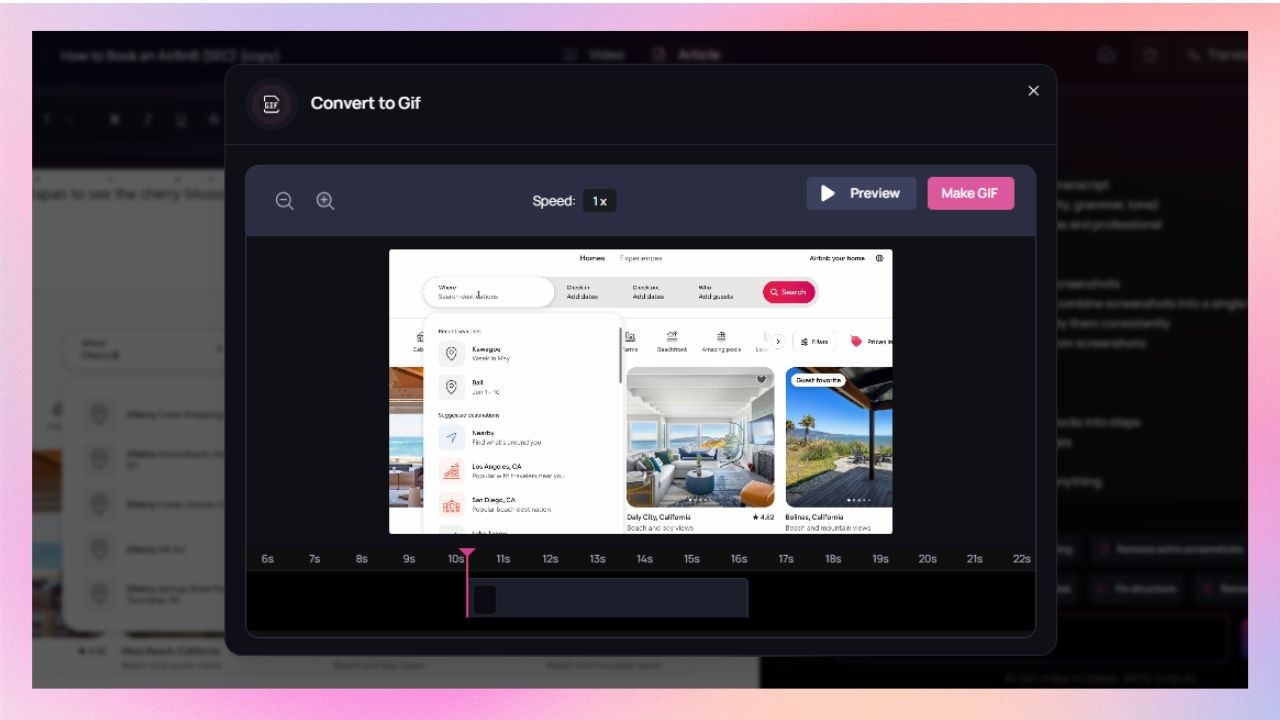 Trupeer also captures screenshots as a part of its documentation workflow but it doesn’t support screenshot-to-GIF creation. > ## Editing tools ### Can I keep content on-brand? **On every Clueso plan. From Trupeer's Scale plan.** Clueso lets you set brand colors, fonts, logos, and an intro and outro once, and applies them across your videos and documentation. [Clueprints](https://www.clueso.io/features/clueprints) go further and carry your layout and editing style too. Trupeer's brand kit, which covers logos, backgrounds, music, and intro and outro slides, starts on its Scale plan. ### Will the tool highlight important on-screen actions for me? **Yes, in both tools.** Both Clueso and Trupeer follows your on-screen steps to automatically adds visual enhancement for better clarity. Clueso adds visual cues like [zoom](https://help.clueso.io/elements/zooms/add-zoom) effects, [spotlights](https://help.clueso.io/elements/spotlight), [callouts](https://help.clueso.io/elements/callout), arrows, [blur](https://help.clueso.io/elements/blur), text,[animation](https://help.clueso.io/elements/image-animations), etc., helping viewers focus on the right actions. 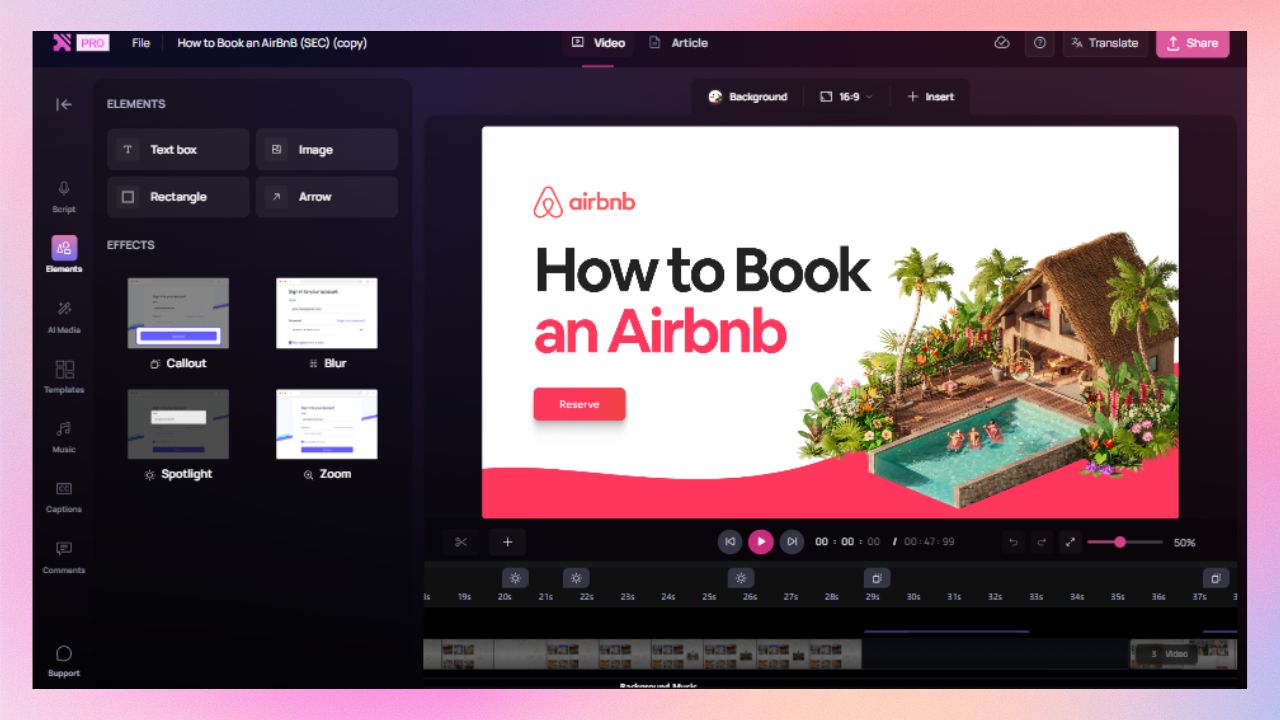 Trupeer adds zoom, annotations, text, and highlight to your videos. ### What about accessibility and localization? **Clueso translates on every plan. Trupeer starts at Scale.** Clueso [translates](https://www.clueso.io/features/auto-translate) your videos and step-by-step guides into 150+ languages, including the voiceover and captions. On the Enterprise plan, a [translation glossary](https://www.clueso.io/features/translation-glossary) controls how your product terms are translated. Trupeer's translation starts on its Scale plan with two languages, and its glossary is Enterprise only. > ## Enterprise readiness ### Does the tool meet enterprise security standards? **Both tools meet enterprise security standards.** Both Clueso and Trupeer comply with SOC2 and ISO 27001 standards, ensuring secure data handling. ### Can teams collaborate in a shared workspace? **Yes, in both tools.** Clueso has Admin, Editor, and Reviewer roles on Business and up, version history on every project, and timestamped [video comments](https://www.clueso.io/features/review-videos-together-without-meetings) on Enterprise. Trupeer's commenting, roles, and review workflow are on its Enterprise plan. > ## Pricing Clueso and Trupeer start at the same price, $40 a month billed yearly. Clueso's entry plan includes doc and deck to video and translation, which Trupeer keeps for its higher tiers, plus motion graphics, which Trupeer doesn't offer. Clueso also has a free plan, where Trupeer offers a 10-day trial. | | Clueso | Trupeer | | --- | --- | --- | | Free option | Free plan, 10 export minutes a month | 10-day trial with a watermark | | Entry plan | Solo: $40/month billed yearly, 1 user | Pro: $40/month billed yearly, 1 creator | | Team plan | Business: $120/month billed yearly for 2 users, +$40 per extra user | Scale: $199/month billed yearly for 3 creators | | Doc and deck to video | Every plan | Enterprise only | > Prices as of November 2026. Check each vendor's site for the latest. ### What does the pricing difference mean in practice? Trupeer bills in credits. A minute of AI video costs 100 credits and a generated doc costs 50, against 2,000 credits a month on Pro, so two 10-minute videos with their docs use up the month. Translation costs another 100 credits a minute for each language, from the Scale plan up. On Clueso, the step-by-step guide and translation are part of every plan. AI credits cover generative extras like motion graphics and AI images, with 2,500 a month on Solo and 3,500 per user on Business. See [Clueso pricing](https://www.clueso.io/pricing) for the full breakdown. Trupeer is built around one starting point, a screen recording, and turns it into a training video and an SOP. Clueso covers that job and the rest of your video work. It builds explainers, launch videos, training, and product walkthroughs from a prompt, a doc, a deck, a URL, or a recording, with motion graphics, AI voiceover, and a step-by-step guide alongside. Pick Clueso if you want one platform for every video your team makes, an AI agent that edits the whole video, and videos that stay current as your product changes. ### Ideal use cases | Best for | Clueso | Trupeer | | --- | --- | --- | | Product teams | ✅ Launch videos, demos, and walkthroughs with motion graphics | ⚪ Recorded walkthroughs | | Support and CX teams | ✅ How-to videos and help articles in 150+ languages | ⚪ How-to videos, translation from the Scale plan | | Training and enablement | ✅ Training from recordings, decks, or docs, with SCORM on Enterprise | ⚪ Recorded process training, doc to video on Enterprise | | Marketing teams | ✅ Explainers and launch videos from a prompt or a script | ❌ Built around screen recordings | | Documentation teams | ✅ Guides with GIFs, exported to HTML, PDF, Markdown, or DOCX | ⚪ Guides exported to DOC, PDF, or Markdown |